

The top streaming gadgets are not always the flashiest devices on a creator’s desk. Beginner streamers often chase 4K webcams, RGB lighting, and expensive accessories before fixing the things viewers notice first: voice quality, face lighting, capture stability, and workflow control.
That buying mistake matters because streaming is a chain, not a single-product upgrade. A better setup starts by understanding which gadgets solve real production problems and which ones only become useful after the basics are handled. That is the same pressure behind smarter streaming gear priorities: creators should upgrade the weakest link first, not the most exciting-looking item.
Top Streaming Gadgets Start With Audio, Not Video
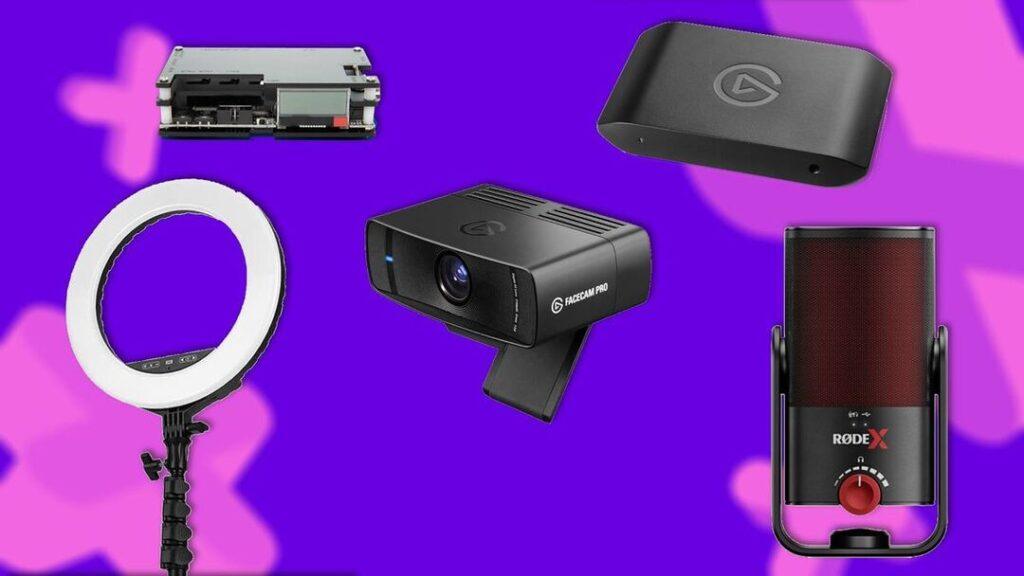
A microphone should usually sit near the top of the review list because bad audio makes a stream feel amateur faster than a soft camera image. Viewers may tolerate a 1080p webcam, but distorted voice, room echo, clipping, and keyboard noise become annoying quickly.
That is why USB and XLR microphones deserve serious attention. A USB mic is easier for beginners because it plugs directly into a computer and usually needs less supporting gear. An XLR mic can offer a cleaner upgrade path, but it also requires an audio interface or mixer, gain control, cables, and better setup discipline.
The review angle should not be “which mic sounds best” in isolation. It should test distance, desk vibration, background noise, keyboard pickup, voice clarity, and how easily the streamer can control levels while live. Voice quality comes first because the stream depends on communication before camera polish.
A boom arm and shock mount belong in the same conversation. They are not glamorous, but they move the microphone closer to the mouth and away from desk bumps. In many beginner setups, a cheap boom arm does more for sound than replacing the microphone.
A Key Light Can Beat A Camera Upgrade
Lighting is the next gadget category creators underestimate. A better webcam cannot perform well in a dark room, and RGB lights behind the monitor do not automatically light the face.
A key light or LED panel gives the camera a clean subject. It helps reduce grain, improves skin tone, controls shadows, and makes the streamer easier to see at a glance. That can make a basic webcam look more intentional and make a premium webcam finally look worth its price.
This is why key lights deserve a higher review priority than RGB kits. RGB lighting builds atmosphere. Key lighting builds visibility. A review should test brightness range, color temperature, diffusion, mounting options, glare on glasses, app control, and whether the light becomes uncomfortable during long sessions.
Lighting fixes the image before resolution does. That makes it one of the most useful purchases for creators who want immediate visual improvement without rebuilding the whole desk.
Capture Cards Still Matter For Console Streamers
External capture cards remain essential for many console streamers because they bring gameplay into the streaming computer with more control than built-in console broadcasting tools. They also matter for dual-PC setups, camera feeds, and creators who want clean OBS scenes with overlays, alerts, chat, and recording options.
OBS supports many source types, including audio sources, browser sources, game capture, display capture, images, text, and capture devices, which makes the streaming software powerful but also dependent on stable input hardware. That broader source control system is why a capture card review should focus on more than resolution.
The useful test is stability. Does the card work cleanly with OBS? Does passthrough feel responsive? Does it handle the console’s target resolution and frame rate? Does audio stay in sync? Does it create heat or random disconnects?
A capture card is not required for every PC-only streamer. But for console creators, it can be the difference between a basic broadcast and a controlled production setup. Capture stability matters because dropped signal or audio sync issues can ruin a stream even when the picture looks sharp.
The Webcam Upgrade Creators Should Question First
A 4K webcam is easy to market because resolution sounds simple. The problem is that streaming quality depends on lighting, framing, bitrate, autofocus, exposure, lens quality, compression, and platform limits.
A 4K webcam deserves a review, but not as the first magic upgrade. It should be judged by how it behaves in real rooms: low light, mixed lighting, glasses glare, fast movement, skin tones, autofocus reliability, mounting stability, and software control.
A streamer using a small facecam window may not need full 4K output. A creator recording YouTube videos, product shots, or cropping into the frame may benefit more. That difference should drive the article angle.
The strongest webcam review should ask whether the upgrade improves the live stream or simply creates a sharper preview inside the creator’s software. If the room is dark, the background is messy, and the key light is weak, a 4K webcam may expose the flaws more clearly.
Here is the useful order for reviewing streamer gadgets by real setup impact:
| Rank | Gadget | Setup Problem It Solves | Best Review Question |
|---|---|---|---|
| 1 | USB/XLR microphone | Weak voice quality | Does it make speech clearer live? |
| 2 | Key light or LED panel | Dark or noisy camera image | Does it improve face visibility? |
| 3 | External capture card | Console capture limits | Is the signal stable in OBS? |
| 4 | Boom arm and shock mount | Bad mic placement | Does it reduce noise and clutter? |
| 5 | 4K webcam | Soft or limited video | Does 4K matter for this stream? |
| 6 | Stream Deck controller | Slow workflow | Does it reduce live mistakes? |
| 7 | USB audio interface | Poor mic control | Does it improve gain and monitoring? |
| 8 | Portable second monitor | Crowded screen space | Does it make chat and OBS easier? |
| 9 | Green screen or backdrop | Messy background | Does it improve focus and privacy? |
| 10 | Streaming headset | Simple audio setup | Is convenience worth the compromise? |
The table shows why the best review topic is not “the most expensive streaming gadget.” It is the gadget that removes the biggest obstacle between the creator and a cleaner broadcast.
Stream Decks And Second Screens Fix Workflow Problems
Once audio, lighting, camera, and capture are stable, workflow gadgets become more interesting. A Stream Deck-style controller can switch scenes, mute microphones, trigger sound effects, launch apps, control lights, and reduce the number of things a creator has to manage manually.
That matters most for creators who already stream regularly. If someone goes live once a month, a control deck may feel like a luxury. If someone streams several times a week, physical shortcuts can reduce mistakes and make transitions cleaner.
A portable second monitor solves a different problem. It gives streamers a dedicated space for OBS, chat, Discord, alerts, music, browser sources, and stream health. For laptop creators or small desks, that can be more useful than buying a larger main monitor.
OBS also recommends hardware encoders when available because they can move encoding work away from the CPU and onto specialized GPU hardware, which supports the larger point behind hardware encoding choices: workflow and performance are connected. A cleaner control setup does not help much if the PC is choking under the stream load.
Optional Gadgets Should Come After The Core Chain
Green screens, RGB lights, backdrops, stream headsets, camera arms, teleprompters, and decorative panels can all improve a setup, but they should be reviewed honestly. Some are production tools. Others are presentation tools. Some are mainly convenience upgrades.
A green screen is useful for messy rooms, privacy, and compact layouts, but it needs lighting to work well. A backdrop can look cleaner than a digital effect if the room has enough space. A streaming headset can simplify audio for beginners, but it rarely beats a dedicated microphone and good headphones for serious production.
RGB lighting belongs later in the upgrade path. It can make a room more memorable, but it should support the camera image rather than fight it. If colored lights spill onto the face or overpower the background, they can make the stream look less polished.
Style should follow function in a streaming setup. The best-looking room still needs a clear voice, stable capture, and controlled lighting.
The Next Streamer Upgrade Should Be Ranked By Impact
The next pressure point for creators is not whether a gadget is popular. It is whether that gadget solves a real problem in the broadcast chain. A microphone fixes communication. A key light fixes visibility. A capture card fixes console control. A Stream Deck fixes workflow. A second monitor fixes attention management.
That is the strongest way to review the top streaming gadgets without turning the article into a shopping list. Rank the gear by impact, test it in a realistic setup, and explain which creators should buy it now versus later.
The top streaming gadgets worth reviewing are the ones that make the creator easier to hear, easier to see, and easier to manage live. The flashy upgrades can wait. A stream improves fastest when the gear supports the viewer experience before it supports the desk photo.