

The rapid growth of livestreaming and gaming content creation has created a strong demand for reliable capture cards. Streamers on platforms like Twitch, YouTube, and Facebook Gaming often rely on external capture devices to record gameplay from consoles or secondary PCs while maintaining smooth performance.
One device that has become particularly popular among creators is the AVerMedia Live Gamer Ultra (GC553). Designed as a high-performance external capture card, it allows gamers to capture high-quality footage while maintaining minimal latency during gameplay.
With support for 4K HDR passthrough, high frame-rate recording, and plug-and-play USB connectivity, the Live Gamer Ultra aims to deliver professional-grade streaming without the complexity of internal PCIe cards.
In this review, we examine its design, features, real-world performance, pricing, and whether it deserves a place in a modern streaming setup.
Design and Build Quality
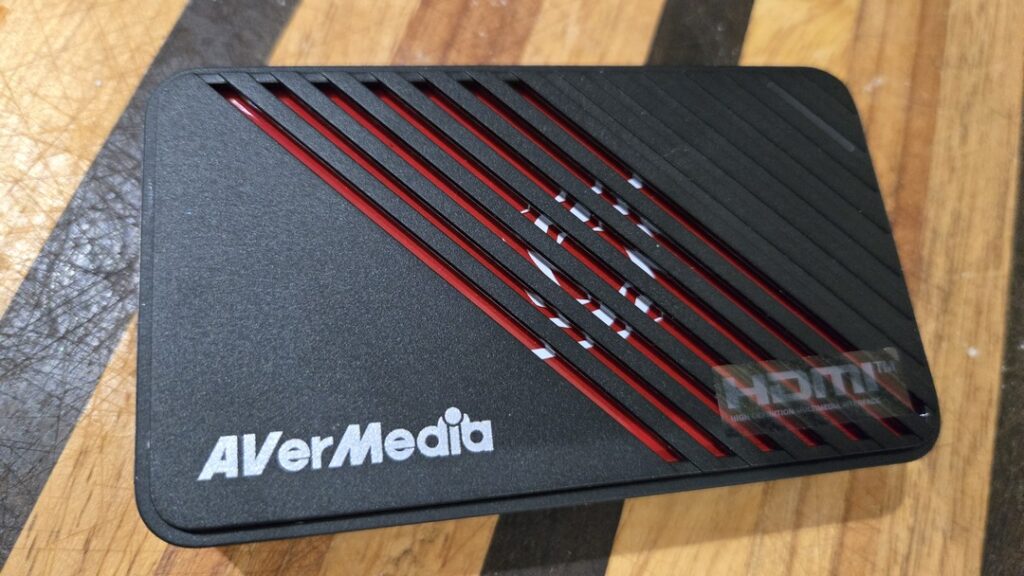
The AVerMedia Live Gamer Ultra features a compact external design that makes it convenient for both desktop streaming setups and portable use.
Unlike internal capture cards that require installation inside a PC, the Live Gamer Ultra connects via USB 3.1 Type-C, making it compatible with laptops and desktops alike.
The device itself has a sleek black finish with subtle branding. It’s small enough to sit on a desk without cluttering your workspace, and its durable construction ensures it can handle regular use.
Key design highlights include:
- HDMI input and output ports
- USB-C connection to the PC
- Compact, lightweight build
- Plug-and-play functionality
Because it operates as an external device, installation is extremely simple. Users only need to connect their console or gaming PC to the HDMI input, connect the HDMI output to a monitor, and plug the USB cable into their streaming PC.
Key Features and Specifications
The Live Gamer Ultra stands out for its ability to balance high resolution with smooth frame rates.
Here are the most notable specifications:
- Capture Resolution: Up to 4K at 30 fps
- Pass-Through: Up to 4K60 HDR
- High Frame Rate Capture: Up to 1080p at 120 fps
- Interface: USB 3.1 Type-C
- Video Input/Output: HDMI 2.0
- Compatibility: Windows and macOS, plus consoles such as PlayStation, Xbox, and Nintendo Switch
The card allows players to enjoy 4K HDR gameplay on their monitor while simultaneously recording footage, thanks to its passthrough technology.
This makes it ideal for gamers who want high visual quality while streaming or recording gameplay.
Performance in Real-World Streaming
Performance is where the Live Gamer Ultra truly shines.
When streaming or recording gameplay, the device delivers low-latency capture, meaning the delay between gameplay and the captured footage is minimal. This is especially important for competitive players and fast-paced games.
One of the device’s biggest strengths is its high frame-rate support. It can capture Full HD video at up to 120 frames per second, which is excellent for smooth gameplay recordings.
This feature is particularly valuable for games like:
- First-person shooters
- Racing games
- Competitive esports titles
Another advantage is the 4K HDR passthrough, which ensures the player can still experience high-quality visuals on their display even if the recording resolution is lower.
Streaming Software and Compatibility
AVerMedia provides its own recording and streaming software called RECentral, which simplifies setup for beginners.
RECentral allows users to:
- Capture gameplay footage
- Record highlights
- Stream directly to platforms like Twitch or YouTube
However, many experienced streamers prefer using third-party tools such as OBS Studio or Streamlabs, which are fully compatible with the Live Gamer Ultra.
Because the device supports the UVC protocol, it functions similarly to a webcam in most streaming applications, making it extremely versatile.
Price and Where to Buy
The price of the AVerMedia Live Gamer Ultra varies depending on the retailer and condition.
Typical price ranges include:
- Around $240 for new units at some electronics retailers.
- Approximately $120–$170 for discounted or used listings on marketplaces such as eBay.
You can find it at major retailers including:
Prices may fluctuate depending on stock availability and regional markets.
Pros and Cons
Pros
- Excellent 4K HDR passthrough
- High frame-rate 1080p120 capture
- Simple plug-and-play setup
- Compatible with OBS and most streaming software
- Portable external design
Cons
- 4K capture limited to 30 fps
- Requires a relatively powerful PC
- HDR support mainly applies to passthrough rather than recordings
Who Should Buy the Live Gamer Ultra?
The AVerMedia Live Gamer Ultra is ideal for several types of creators.
Console Streamers
Gamers using PlayStation, Xbox, or Nintendo Switch can easily capture gameplay without affecting console performance.
Dual-PC Streamers
Many professional streamers use a two-computer setup, where one PC handles gameplay and the other manages streaming. This capture card fits perfectly into that workflow.
Content Creators and YouTubers
Creators who record gameplay for editing and highlights will benefit from the high frame-rate recording capabilities.
However, beginners who only stream occasionally may find cheaper capture cards sufficient.
Final Verdict
The AVerMedia Live Gamer Ultra remains one of the most capable external capture cards for streamers who want high-quality recordings without complicated installation.
Its combination of 4K HDR passthrough, smooth 1080p120 capture, and easy USB connectivity makes it a strong option for modern streaming setups.
While it does have limitations such as 4K capture capped at 30 fps it still delivers excellent performance for most content creators.
If you are serious about streaming or recording gameplay and want a reliable external capture card, the AVerMedia Live Gamer Ultra is a solid investment.
RAVE-TECH Final Score: 8.8 / 10