

The Stream Deck Plus vs MK.2 debate matters because creators are no longer buying streaming gadgets just to look professional on camera. They are buying control, and the right Stream Deck can decide whether a setup feels smooth, stressful, or needlessly complicated during a live show.
Elgato’s Stream Deck MK.2 is the familiar 15-key controller many streamers know, while the Stream Deck + adds dials and a touch strip for a more studio-style command center. Both can improve a creator’s workflow, but the better value depends on whether you need more buttons or more physical control over audio, lighting, and production adjustments.
Why Stream Deck Plus vs MK.2 Is A Real Creator Decision
A Stream Deck looks simple from the outside: a small desktop controller with customizable keys that trigger actions. But for streamers, podcasters, YouTubers, editors, and remote professionals, it can become the center of the desk. Scene switching, mic muting, source toggling, sound effects, app launches, camera controls, smart lighting, and OBS shortcuts all become one-touch commands. That kind of production control reduces friction when timing matters.
The MK.2 represents the classic Stream Deck idea. It gives users 15 customizable LCD keys, each capable of launching actions, folders, multi-actions, hotkeys, or app-specific commands. The Stream Deck + takes a more tactile route with eight LCD keys, four multifunction dials, and a horizontal LCD touch strip. That shift changes the entire buying calculation. It is not only newer; it is built around a different kind of discipline.
That is why the comparison is more interesting than “which one has more features?” The MK.2 gives creators more button real estate. The Stream Deck + gives creators more hands-on adjustment. If you are producing a livestream, podcast, tutorial, gaming session, or desk-based studio show, that difference creates real pressure around the purchase. A creator who buys the wrong one can still make it work, but the right one brings instant confidence and clarity.
What A Stream Deck Actually Changes
A Stream Deck is best understood as a shortcut surface. Instead of digging through menus, remembering keyboard combinations, clicking through OBS panels, or adjusting software sliders with a mouse, you assign those tasks to dedicated controls. The result is not magic. It is a better interface for repeated tasks that steal attention.
That matters because live production punishes hesitation. A streamer does not want to search for the mute button while talking to chat. A podcaster does not want to fumble through software to lower music volume. A YouTuber recording a tutorial does not want to break concentration to open folders, trigger transitions, or change lighting scenes. Stream Deck controls turn those moments into buttons, and buttons create rhythm.
The difference between the MK.2 and Stream Deck + is how that rhythm feels. The MK.2 is about direct access: press a key, trigger an action. The Stream Deck + adds analog-style movement through its dials, which is better when the task is not simply on or off. Volume, brightness, zoom, gain, and balance are not always binary. They often require precision, and dials can deliver that speed better than repeated taps.
Design And Hardware: More Buttons Or More Control?
The MK.2 is the cleaner, smaller, more familiar option. It has 15 LCD keys arranged in a simple grid, which makes it easy to organize scenes, apps, folders, and shortcuts. Its size is desk-friendly, and the layout is immediately understandable. That simplicity is part of its utility.
The Stream Deck + is physically larger and more console-like. It has fewer keys, but the dials and touch strip change how it behaves. Each dial can be turned and pressed, allowing it to handle tasks that feel awkward on a button-only device. That makes it more attractive for audio levels, lighting intensity, camera settings, and other adjustable controls. The trade-off is key density. You lose seven LCD buttons compared with the MK.2, but gain a different kind of flexibility.
This is where buyers should be honest about how they work. Some creators want every function visible on the surface. They prefer separate keys for starting a stream, changing scenes, launching music, muting Discord, posting a chat message, opening a folder, and triggering an alert. That buyer will appreciate the MK.2’s 15-key grid because it builds muscle and memory quickly.
Other creators want a more production-console feel. They want to ride audio levels, tweak lights, adjust mic gain, or control a mixer-like setup without dragging sliders. That buyer will feel the Stream Deck + advantage immediately. The dials add tactility, while the touch strip gives additional visual feedback.
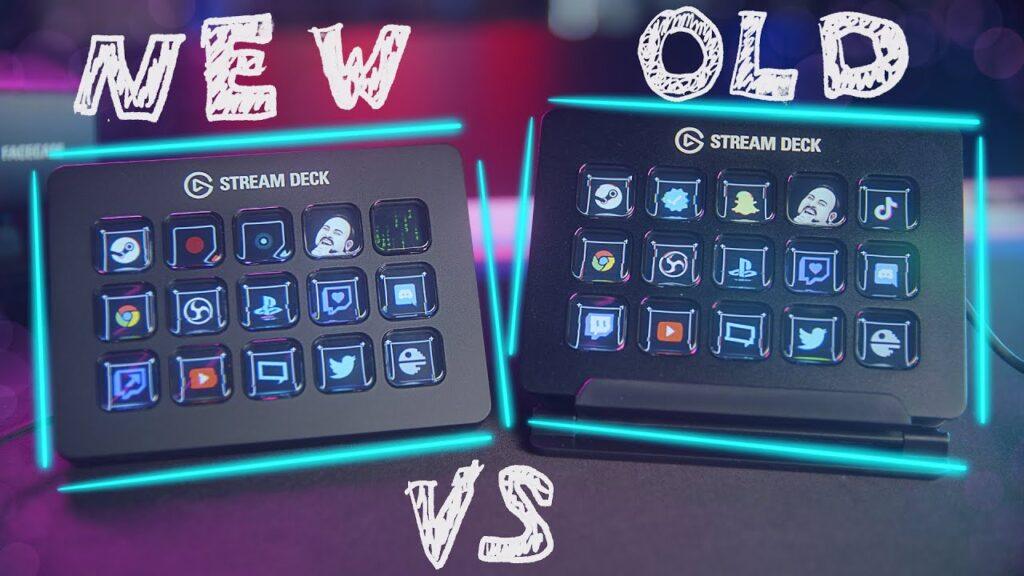
Readers comparing the hardware philosophy behind Stream Deck Plus vs MK.2 should start with that difference: the MK.2 is a button board, while the Stream Deck + is closer to a compact desktop control surface.
Audio Control Is Where Stream Deck + Pulls Ahead
The strongest argument for Stream Deck + is audio. Streaming is not just video. It is microphone level, game volume, music level, chat audio, browser sources, alerts, and sometimes a guest call. When those layers compete, a creator needs fast audio control without losing momentum.
The MK.2 can control audio through buttons and software actions. It can mute, unmute, switch outputs, launch apps, and trigger sound effects. That may be enough for many streamers. But once audio becomes something you adjust constantly rather than occasionally, dials make more sense. Turning a knob feels more natural than repeatedly pressing a key to raise or lower volume.
The Stream Deck + becomes especially useful when paired with software that treats the dials like mixer controls. A podcaster can dedicate dials to mic gain, headphone volume, music level, and system audio. A gaming streamer can separate game audio, voice chat, microphone, and alerts. A creator with lights can use dials for brightness or color temperature. That turns the device from a shortcut pad into a small mixing station.
This is the clearest reason to spend more on Stream Deck +. If your setup has multiple audio sources or adjustable devices, the dials are not a gimmick. They provide balance, and for many creators, balance is the whole point of upgrading from software-only control. The Stream Deck + is the better priority when the desk needs a production upgrade, not just more shortcuts.
Why The MK.2 Still Makes More Sense For Many Streamers
The Stream Deck MK.2 should not be dismissed just because the Stream Deck + is more advanced. For many creators, the MK.2 is still the smarter purchase because it solves the most common streaming problems with fewer complications. It gives you 15 visible shortcuts and keeps your focus on direct commands.
That matters for beginners. New streamers often need scene switching, start and stop recording, mute mic, open OBS, launch Spotify, clip a moment, trigger overlays, and manage chat tools. Those tasks are better served by clear buttons than by dials. You can build a page for streaming, a page for editing, a page for work, and a page for gaming. The MK.2 makes that structure easy to understand.
The MK.2 is also excellent for people who rely heavily on OBS scenes and simple macros. If your workflow is mostly built around “press this and something happens,” the extra keys are valuable. A 15-key surface gives more room to separate scenes and commands without constantly moving through folders. That keeps the setup fast.
There is also a comfort factor. The MK.2 has been around long enough to feel proven. It has broad compatibility, a familiar layout, and a huge base of tutorials, icons, profiles, and plugins. For someone building a first streaming desk, that reliability has weight. The format is less ambitious, but it is also less demanding.
Desk Setup, Space, And Everyday Use
A streaming gadget has to live on the desk, not just look good in a product image. The MK.2 is compact enough to fit beside a keyboard, under a monitor, or next to an audio interface. It does not dominate the workspace. For smaller desks, that space advantage matters.
The Stream Deck + takes up more room and has a taller, more control-surface-like presence. That can be good if you want it to be a central tool, but less ideal if your desk is already crowded with a mic arm, keyboard, mouse, speakers, camera controls, and lighting gear. The device rewards people who will actually keep it within easy visibility.
Placement also changes how useful each model feels. The MK.2 can sit off to the side because most actions are quick button presses. The Stream Deck + should be placed where the dials are comfortable to reach. If you are constantly adjusting volume or lighting, poor placement can ruin the experience. Good ergonomics and easy reach make the Plus feel much more valuable.
Price also enters the desk conversation. The MK.2 is usually the easier recommendation for creators who want Stream Deck functionality without buying the more production-focused model. The Stream Deck + makes more sense when its dials replace other devices, reduce software fiddling, or simplify a more complex setup. The cost is easier to defend when it replaces multiple controls in one bundle.
For buyers comparing several models, a broader Stream Deck buying context can help separate what looks impressive from what most creators will actually use every day.
Software And Ecosystem: The Hidden Reason Both Are Strong
The Stream Deck line works because the hardware is only half the story. The real strength is the software ecosystem behind it. Profiles, folders, multi-actions, plugins, icon packs, and app integrations make these devices useful across streaming, editing, productivity, design, meetings, and smart home control. That software layer gives both models long-term ecosystem value.
A basic use case might be OBS scene switching. A more advanced use case might combine several commands into one press: start recording, switch lights, open a script, launch music, mute notifications, and set the correct audio profile. That is where Stream Deck devices become more than fancy buttons. They become a form of desktop automation.
The MK.2 benefits from the same software strength as the Plus. The difference is input style. Buttons are perfect for fixed actions. Dials are better for adjustable parameters. The touch strip on the Plus adds another layer for navigation and visual context, especially when dials are assigned to multiple functions.
Still, software power can also become a trap. A Stream Deck is only as good as the profile you build. Some buyers expect the device to improve everything instantly, then abandon it when setup requires thought. The best experience comes from gradual maintenance. Start with a few actions, use them daily, then expand. Otherwise, the deck becomes a beautiful piece of complexity.
For buyers who want exact hardware details before choosing, the official Stream Deck MK.2 technical specifications are useful when desk space, operating system support, weight, cable setup, and physical dimensions matter.
Comparison Table: Elgato Stream Deck + vs Stream Deck MK.2
| Category | Stream Deck + | Stream Deck MK.2 |
|---|---|---|
| Best For | Audio control, lighting, production-style setups | Scene switching, hotkeys, shortcuts, beginner streaming |
| Main Controls | 8 LCD keys, 4 dials, touch strip | 15 customizable LCD keys |
| Strongest Advantage | Better for adjustable controls | More visible buttons in a compact layout |
| Best Creator Type | Podcasters, streamers with complex audio, studio-style users | Beginners, gamers, OBS users, productivity shortcut users |
| Desk Feel | Larger, more like a mini control console | Smaller, cleaner, easier to place |
| Learning Curve | Slightly higher because dials need planning | Easier because everything is button-based |
| Main Trade-Off | Fewer keys and higher cost | No physical dials or touch strip |
| Best Value Case | Replaces multiple controls in a serious setup | Gives most creators the core Stream Deck experience |
Who Should Buy Stream Deck +?
Stream Deck + is the better choice for the creator who wants a more physical production surface. If you adjust levels, lights, sources, music, or monitoring often, the dials justify themselves quickly. This is not just a streamer gadget; it can become the desk controller for a more serious creator setup.
It is especially strong for podcasters, live hosts, video producers, and streamers who care about sound. If your mic, music, game audio, chat audio, and alerts all need quick adjustment, the Plus feels more natural than a button-only deck. That is a practical judgment, not a luxury preference.
A podcaster may use the dials more than the keys. A streamer with lighting scenes, camera settings, and audio routing may feel the same way. If your setup already includes an audio interface, key lights, camera control, and multiple apps, the Stream Deck + can become the device that ties the desk together.
The only caution is that the Plus is not automatically better for everyone. Eight keys can feel limiting if you expected a large shortcut board. A buyer who mostly wants visible commands may feel boxed in sooner than expected. The Plus works best when the dials are central to the workflow, not decorative.
Who Should Buy Stream Deck MK.2?
The MK.2 is the better choice for most new streamers and many experienced creators who want fast, simple control. It gives you more keys, a smaller footprint, and a familiar setup path. That makes it the safer budget pick even when it is not the most advanced model.
It is ideal for OBS scene switching, soundboard controls, shortcuts, app launches, editing macros, meeting controls, and everyday productivity commands. The 15-key grid has enough room for meaningful organization without overwhelming the desk. A beginner can start simple, then build more complex pages over time.
The MK.2 also makes sense for users who do not need dials. If you rarely adjust audio manually, if your lights are already automated, or if your streaming setup is mostly scene-based, the Plus may be more device than you need. The MK.2 gives you core Stream Deck power without forcing a different workflow.
That makes the MK.2 the better first Stream Deck for many buyers. It has scalability, but it does not demand a studio mindset. You can use it lightly or build it into a serious command center. That flexibility is why the 15-key model remains so easy to recommend.
The Verdict: Which Streamer Gadget Is Actually Worth It?
The Stream Deck + is the better gadget if your setup needs dials. That is the entire verdict in one sentence. It wins for audio-heavy creators, podcasters, streamers with lighting controls, and anyone who wants a more hands-on production console. For that user, the Plus is the stronger winner because the hardware matches the fit.
The Stream Deck MK.2 is the better buy for most people who simply want Stream Deck functionality. It is easier to understand, easier to place, and more generous with visible keys. It handles the classic streaming tasks beautifully: scenes, hotkeys, sound effects, app controls, folders, and multi-actions. That makes it the safer choice for beginners and the cleaner strategy for creators who want speed over studio-style control.
The mistake is treating one as the obvious upgrade over the other. They are not arranged in a simple ladder. They serve different desk personalities. The MK.2 is a button-first shortcut pad. The Stream Deck + is a control-first production surface. A gamer streaming a few nights a week may be happier with the MK.2. A podcast host balancing music, mic levels, guest audio, and lighting may wonder how they worked without the Plus.
The smarter buying decision starts with your routine. Count the tasks you trigger versus the settings you adjust. If most of your work is pressing commands, buy the MK.2. If much of your work is turning levels, balancing sources, and fine-tuning the room, buy the Stream Deck +.
That is why Stream Deck Plus vs MK.2 remains one of the best comparison reviews in creator tech. Streaming gear is moving away from flashy desk toys and toward tools that reduce stress under live conditions. The opportunity is momentum: better control, cleaner shows, fewer mistakes, and a setup that feels built around the creator instead of the other way around. The risk is buying the model that looks cooler rather than the one that matches your actual routine. For most buyers, the MK.2 is still the practical standard; for serious production control, the Stream Deck + is the one that feels like the future.