

Remember when streaming was just using a webcam in your basement? Those days are over. Today, it’s a high-tech race. You’re not just playing games; you’re running a studio from your desk.
I’ve seen this change up close, from Twitch’s early days. We were pioneers, broadcasting from digital submarines. Now, with over half a million followers, I know a hard truth: your hardware is your business.
This is a classic problem for digital entrepreneurs. You need money to buy the gear that makes money. Those first donations or subscribers are your start-up capital. Spending it wisely turns your hobby into a business that makes money.
It’s not just about looking good. It’s about keeping viewers, building a community, and attracting sponsors. We’ll look at the key streaming PC upgrades and other improvements to boost your earnings.
PC and Console Upgrades
A console streamer’s secret weapon isn’t a new controller; it’s a tiny box that unlocks cinematic quality. For PC enthusiasts, upgrading is like a full-system symphony. Your machine does more than play the game. It encodes video, manages overlays, and listens to chat all at once.
Trying to do this on weak hardware is like asking a stagehand to do too much. The show will fail.
Community setups often show a common plea: “I need to escape my laptop.” This isn’t just envy. It’s a reality based on data. A dedicated streaming PC or a powerful gaming rig is essential. Think of it as building a film crew inside a tower.
The CPU (Processor) is your director and editor. It needs enough cores to handle tasks without a meltdown. An 8-core chip is often the sweet spot for smooth streaming PC upgrades.
The GPU (Graphics Card) is your cinematographer. It renders game visuals and overlays. A powerful GPU makes your stream look like a movie, not a slideshow.
Then there’s RAM. This is your backstage crew’s working memory. Skimp here, and your software will forget its lines and freeze. 32GB is quickly becoming the new standard.
For console warriors, the equation changes. The console is a powerful game player. But streaming directly from it often makes your footage blurry. Your ticket to quality is a capture card. It takes the pristine HDMI signal from your console and feeds it, untouched, into your broadcasting PC.
To visualize how these parts work in concert, let’s break down their roles:
| Component | Primary Role | Streaming Function | Upgrade Priority |
|---|---|---|---|
| CPU (Processor) | Calculates game logic & system tasks | Encodes the video stream for broadcast (most critical job) | High – Directly impacts stream smoothness |
| GPU (Graphics Card) | Renders game visuals | Handles game graphics + stream overlays/alerts | High – Affects in-game & on-stream visual quality |
| RAM (Memory) | Short-term data storage for active programs | Allows game, streaming software, and browser to run simultaneously | Medium-High – Prevents lag and crashes from multitasking |
| Capture Card (Console) | N/A (External Device) | Captures clean, high-quality video feed from console for PC to broadcast | Essential – The cornerstone of professional console streaming |
The goal of any streaming PC upgrades isn’t just more shiny parts. It’s creating a system where the tech disappears. Your viewers see only the game and you, not the stutters, freezes, or pixelated artifacts of a machine pushed beyond its limits. Invest in the core, and everything else you add—mics, lights, cameras—actually has a chance to shine.
Audio and Visual Gear Recommendations
Your audience will put up with bad visuals but not poor audio. Bad sound quality is a major turn-off. Good audio is key to keeping viewers engaged.
Think of your microphone as the base of your streaming setup. Even with great visuals and lighting, bad audio ruins everything. Many streamers swear by certain microphones for their quality.
The Microphone Hierarchy: From Beginner to Broadcast
For newbies, USB microphones are easy to use. The Blue Yeti is a popular choice for beginners. It’s reliable but has its limits.
For those looking to improve, XLR microphones are a step up. Brands like FIFINE offer good options that sound much better than USB mics. This is when you start to sound like a pro.
Headsets with good mics, like the Razer Kraken or Logitech models, are great for learning. They’re not perfect but help you get started. Remember, they’re just the beginning.
The Visual Upgrade: Beyond the Laptop Camera
Your laptop webcam is okay but not impressive. It shows you’re not serious about streaming. Upgrading your visuals shows you’re committed.
The Logitech C920X is a top pick for those on a budget. It’s reliable but not flashy. The Logitech Brio offers better quality for those who want more.
Dedicated streaming cameras are for serious streamers. The Hollyland VenusLiv Air is a top choice. It offers high-quality visuals and is easy to use.
The Console Streamer’s Secret Weapon
Streaming from consoles is not ideal. It limits your quality and customization. You need better tools to grow.
Capture cards are essential for console streamers. They help you capture your gameplay in high quality. Brands like Elgato make great options.
Without a good capture card, your stream looks poor. It’s like showing a copy instead of the original. The difference is huge.
| Gear Type | Top Picks | Best For | Price Range |
|---|---|---|---|
| USB Microphones | Blue Yeti, Razer Seiren Mini | Beginners, simple setups | $60-$150 |
| XLR Microphones | FIFINE K669, Audio-Technica AT2020 | Intermediate to advanced streamers | $70-$250 (plus interface) |
| Streaming Webcams | Logitech C920X, Logitech Brio | PC streamers needing visual upgrade | $70-$200 |
| All-in-One Cameras | Hollyland VenusLiv Air | Professional streamers wanting cinematic quality | $400-$800 |
| Capture Cards | Elgato HD60 X, AverMedia Live Gamer Ultra | Console streamers, recording gameplay | $150-$300 |
Choosing the right gear is about knowing your goals. Your microphone and camera show your level of commitment. They’re the first things viewers notice.
The best microphones for streamers are those that match your goals. Capture cards are key for console streamers. They make a big difference in quality.
Good audio is more important than high visuals. Viewers will forgive bad visuals but not bad sound. Focus on audio first.
Lighting and Green Screens
Bad lighting can make even the most charming gamer look guilty. Harsh overhead lights or dark settings don’t help your brand. Lighting is key to your on-screen credibility.
Light acts like digital makeup. It hides shadows and smooths out blemishes. Proper lighting means less grain and a clearer image. This boosts your production value without you even realizing it.
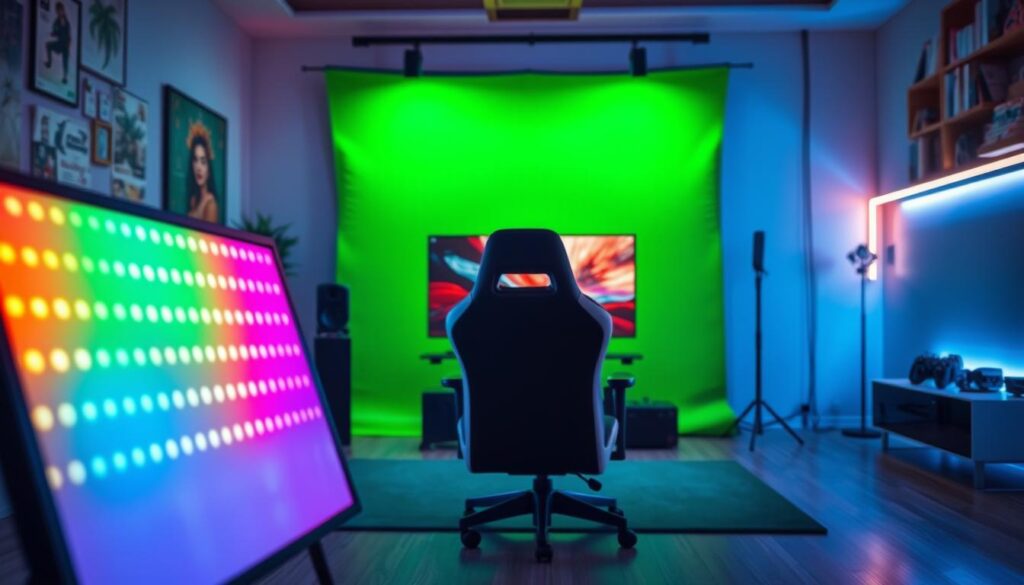
Streamers now use customizable LEDs. Brands like Govee are popular for their LED strip lights. These lights let you change your background color easily. It’s a way to enhance your visuals without spending a lot.
But there’s more to it than just lighting. You also need to control what’s behind you. That’s where the green screen comes in. It lets you hide your messy room and show anything you want instead.
A green screen makes your frame cleaner and more focused. It shows you’re serious about your craft. In the streaming world, this is a big advantage. It tells viewers you’re invested in their experience.
Think of lighting and green screens as essential tools:
- Lighting: It improves camera quality and sets the mood.
- Green Screen: It gives you control over your background, making you look more professional.
Even with expensive gear, bad lighting ruins everything. Investing in good lighting is the smartest move for your gaming gear. It turns a basic webcam feed into something professional. Create a space that looks like a studio, not a cave.
Ergonomics for Long Streams
While viewers see your charismatic persona, they don’t see the chair slowly turning into torture. Streaming is like a physical marathon, not just a digital show. Your body pays the price with poor posture, a bad investment.
The right gaming gear isn’t just about looks. It’s about supporting your body. Think of it as building a cockpit for an eight-hour flight. A good gaming chair with lumbar support is like pelvic scaffolding.
Your desk is also key. An adjustable height desk lets you switch between sitting and standing. It’s not just a trend; it’s about keeping your blood flowing. Stagnant blood means a foggy mind, and viewers can tell.
Where you place your monitor is all about physiology, not just what you like. The top of your screen should be at or slightly below eye level. Your keyboard and mouse should let you keep your wrists straight, like a handshake. Every inch of misalignment adds pressure over time.
This is where squeak-free chairs and silent peripherals are secret weapons. Any noise can break the immersion. A creaking seat during a tense moment is more funny than serious.
There’s a direct link: physical comfort equals mental clarity equals better engagement. A streamer in pain is distracted. Their reactions slow down. Their commentary gets dull. The audience feels it, even if they can’t say why.
Investing in ergonomic gaming gear is smart. It lets you stream longer. It boosts your energy on camera. It’s the difference between a short career and a long one. Your setup should be strong, not weak.
Peripheral Gadgets for Engagement
Peripheral gadgets are key to streaming success. They turn your PC into a powerful tool. These gadgets help you control the show, not just watch it.
The Elgato Stream Deck is more than a button box. It’s a control center for your stream. With it, you can change scenes and sounds with just a press. It’s like having a studio team at your fingertips.
Specialized gaming gear boosts both performance and presentation. A high-DPI mouse like the Razer Viper ensures precise control. Customizable keyboards flash when you get donations or followers. These tools are more than just tools; they’re visual signs of excitement.
Using a dedicated gamepad shows you’re serious about your stream. It signals to your audience that you’re committed to quality. This detail makes you stand out from hobbyists.
Why is gaming gear so important? It makes your stream smoother. When you’re not stuck in menus, you can chat with viewers. Automated alerts add to your stream’s value, making it more engaging.
The right gear creates a positive cycle. Better control means smoother streams. Smoother streams keep viewers watching. Engaged viewers are more likely to participate, turning your stream into an event.
Every minute saved on tech means more time for fun and connection. Investing in smart gaming gear is worth it. It helps you keep your audience’s attention.
Cost-Benefit Analysis for Monetization
Every dollar you spend on new gear isn’t just an expense. It’s a chance to earn your next paycheck. Think of it like this: the better your setup, the more you can make.
Your audio and visual quality are key to your credibility. A good mic isn’t a luxury. It’s what can make or break a brand deal. Sponsors check your production quality, not just your pitch.
Here’s the data: a streamer with 10k followers can earn $500 to $2,000 for a sponsored segment. This isn’t a dream. It’s the real value of professional streaming. Bad audio can cost you big time.

Imagine spending $1,500 on gaming tech upgrades for streamers. This isn’t just spending. It’s a smart investment.
The benefits are many:
- Sponsorship Readiness: You’re ready for better brand deals that need top-notch audio.
- Subscription Conversion: Your “pro” stream makes viewers more likely to subscribe, boosting your income.
- Platform Algorithm Love: Better production means longer watch times, which platforms reward with more visibility.
Think of it as a cycle of growth. Better tech means better content. Better content attracts more viewers. More viewers mean more money. That money funds your next upgrade. You’re not just buying gear. You’re building momentum.
The $300 microphone upgrade can pay for itself with one sponsorship. The lighting kit can boost your subscriber count. This is the math behind a successful stream.
Your setup is your business’s backbone. Treat it as such. The ROI on gaming tech upgrades for streamers isn’t just in specs. It’s in the emails, notifications, and donations. The numbers are in your favor.
Where to Shop and Save
Getting the gear you need doesn’t have to break the bank. The streaming world has found ways to save without sacrificing quality. Let’s explore where the pros shop.
Amazon is a treasure trove for gaming gear. It offers everything from top brands to hidden gems. User reviews are often more trustworthy than influencer endorsements. But, always keep an eye out for deals and discounts.
Thrifting is a secret weapon. One streamer found two working monitors for just $20. Thrift stores and online marketplaces can yield great finds. It takes patience, but the rewards are worth it.
Refurbished items are a smart choice. Sites like Dell and Best Buy offer them with warranties. It’s a cost-effective way to upgrade your gear.
Affiliate programs are another smart move. By promoting gaming gear you love, you can earn money. It’s a way to make your upgrades pay off.
| Venue | Best For | Price Range | Pro Tip |
|---|---|---|---|
| Amazon | Everything, including mics, lights, and peripherals | $ – $$$ | Read the 3-star reviews for balanced takes |
| Thrift Stores / Marketplace | Monitors, chairs, basic peripherals | $ | Test everything in person; patience required |
| Manufacturer Refurbished Sites | PC components, monitors, high-end gear | $$ – $$$ | Look for “certified” with full warranty |
| Specialty Retailers (Best Buy, Micro Center) | High-touch purchases, bundles | $$ – $$$$ | Price match guarantees are your best friend |
| Direct from Brand Sites | Niche peripherals, stream decks, custom gear | $$$ – $$$$ | Sign up for newsletters for first-access sales |
Focus on what’s most important. Don’t spend all your money on fancy lights before getting a good mic. Plan your upgrades wisely.
Successful streamers start with audio, then lighting, and move to PC components. This order helps you find deals for each type of gaming gear.
Set up price alerts and follow deal subreddits. The savings add up. Remember, it’s about smart spending, not just the price.
Shop with strategy, not impulse. Your wallet and future streaming self will appreciate it. The right gaming gear at the right price is out there, waiting for you.
Community Recommendations
Forget the lists made by algorithms. The real truth comes from Twitch chat and Discord servers. Here, you find honest opinions after hours of streaming.
When many streamers talk about the Logitech G733 headset’s comfort, that’s real data. It’s not just marketing. It’s collective intelligence from actual use.
The beauty of this system is its detail. Need a capture card for a vintage PS4? There’s a thread for that. Struggling with OBS filters for your Blue Yeti? Someone has solved that problem.
Platforms like Discord, Reddit, and Lemon8 are like digital town squares. Scrolling through these posts is like digging through history. You find real-world testing, failure, and success.
This is not just about finding the best gear. It’s about learning from others’ mistakes. You’re networking with the setup sages who’ve already tried everything.
The streaming community values trust above all. A product that stands up to scrutiny earns its reputation honestly. You learn which “budget” microphone sounds premium and which “gaming” chair lasts.
Building your stream means tapping into this collective wisdom. The streaming community doesn’t just recommend gear. They explain why it works, how to set it up, and what quirks to expect. That’s knowledge no algorithm can match.
Conclusion
This journey through hardware isn’t about chasing shiny objects. It’s about building a professional foundation. Your gaming tech upgrades for streamers represent a direct investment in your channel’s future.
Think of your stream as a small business. The camera, microphone, and lighting aren’t expenses. They’re capital improvements. A crisp Hollyland feed or a smooth Elgato capture card pays dividends in viewer retention.
Monetization follows professionalism. Audiences spot quality. They reward it with loyalty, subscriptions, and support. The right gaming tech upgrades for streamers transform a hobby into a viable platform.
Start with one piece. Master it. Then level up another. This strategic approach turns overwhelming costs into manageable milestones. Your community will notice each improvement.
The data is clear. Streamers who invest in their setup grow faster. They suffer fewer technical disasters. They enjoy the process more. Your sanity is worth the price of a good chair.
Now go build that experience. Your next upgrade awaits. The stream starts now.