

RGB lighting vs key lighting is the difference between making a room look exciting and making a streamer look clear on camera. Both can improve a setup, but only one usually fixes the face, exposure, shadows, and webcam quality viewers actually notice first.
That distinction matters because many new creators buy background glow before they buy real front-facing light. RGB strips, panels, and reactive effects make a setup feel more alive, but a weak face light can still make an expensive webcam look noisy. A focused compact Elgato light style upgrade often solves more visual problems than adding another color strip.
RGB Lighting vs Key Lighting Starts With The Camera
A camera needs light before it needs atmosphere. If the face is underexposed, the webcam raises gain, softens detail, creates grain, and struggles with color. A key light gives the camera a clean subject to expose.
RGB lighting usually sits behind or around the streamer. It shapes the room, adds color, and separates the person from the background. That can look great, but it does not always illuminate the face.
Elgato’s Key Light MK.2 specs show why dedicated lighting is built differently: adjustable brightness, color temperature control, and a design meant to light a workspace. Those key light specifications point to a practical truth. Webcams need clean light first.
| Setup Goal | RGB Lighting | Key Lighting |
|---|---|---|
| Better face exposure | Weak | Strong |
| Room atmosphere | Strong | Moderate |
| Background color | Strong | Weak |
| Webcam clarity | Indirect help | Direct help |
| Stream identity | Strong | Supportive |
| First upgrade priority | Later | Earlier |
| Best use | Mood and branding | Face and subject visibility |
RGB Makes The Room Memorable
RGB lighting is not useless. It gives a streaming setup personality. A wall wash, monitor backlight, shelf accent, or reactive game effect can make a room feel designed instead of random.
That matters for branding. A streamer’s background becomes part of the channel identity, especially when clips circulate on short-form platforms. Color can create mood, separate content categories, and make a small room feel more intentional.
Razer’s Chroma ecosystem shows how far RGB has moved beyond simple strips, with game integrations, customizable effects, and connected devices. That broader lighting ecosystem can make a setup feel more immersive.
The mistake is using RGB as the main camera solution. Color behind the streamer cannot replace a good key light in front of the streamer. It can make the background better while leaving the face worse.
Key Lighting Fixes The Stream First
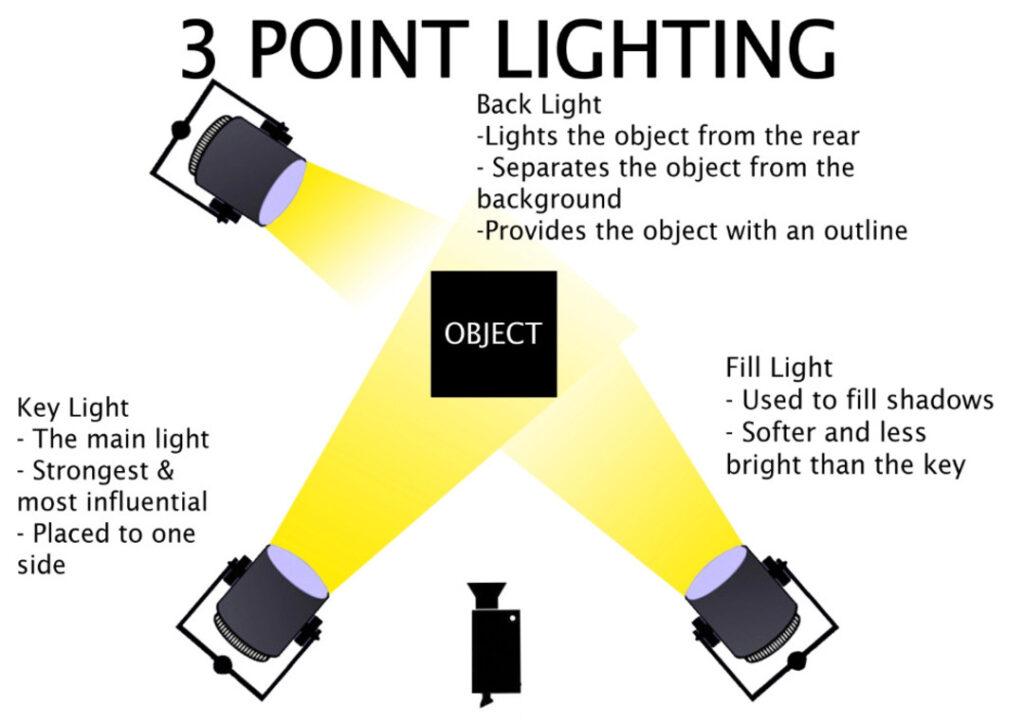
A key light is the main source that illuminates the subject. For streamers, that subject is usually the face. A properly placed key light helps define facial features, reduce shadows, improve eye visibility, and make skin tones look more natural.
It also gives the camera less work to do. When the face is bright enough, the webcam can use lower gain and more stable exposure. That often improves image quality more than switching from a 1080p camera to a 4K model in poor lighting.
Placement matters. A key light should usually sit slightly above eye level and off to one side, not blast directly into the face from below. Harsh placement can flatten the image or create glare on glasses. Light direction matters as much as brightness.
Color Temperature Can Make Or Break The Look
Streamers often overlook color temperature. A key light that is too warm can make the image look yellow. A light that is too cool can make skin look pale or harsh. Mixing daylight from a window with warm room lamps and RGB colors can confuse the camera’s white balance.
Adjustable key lights help because creators can match the room and camera settings. The goal is consistency. A stream should not shift from blue to orange every time the monitor changes content or the sun goes down.
RGB should be treated as accent color, not uncontrolled color spill. If strong red, blue, or purple light hits the face, skin tones can look unnatural. That may work for a stylized scene, but it is less reliable for everyday streaming.
Background Glow Should Support The Face
The best streaming setups use both lighting types in different roles. The key light handles the subject. RGB handles the environment. A small backlight or colored wall light can add depth, but it should not compete with the face.
This is where balance matters. If the background is brighter than the streamer, the viewer’s eye goes to the wall instead of the person speaking. If the RGB is too saturated, compression can make the stream look muddy. If the key light is too strong, the background may disappear.
A practical setup might use one key light, one soft fill from the monitor side, and one RGB accent behind the streamer. That is usually better than covering the room in color and hoping the webcam figures it out.
Budget Streamers Should Buy In The Right Order
A new streamer should usually buy lighting in this order: key light first, then background accent, then RGB effects. The first job is to make the person visible. The second job is to make the room intentional. The final job is style.
This order prevents wasted upgrades. A cheap webcam with a good key light can look surprisingly clean. A premium webcam in a dark RGB room can still look noisy and underexposed.
Budget buyers can start simple with a small LED panel, soft lamp, or diffused light. The exact product matters less than consistency, placement, and control. The camera rewards stable light, not expensive color effects.
The Next Streaming Lighting Battle Is Control
The next pressure point for streamer lighting is not just brightness. It is control. Creators need lights they can adjust quickly before going live, save presets for different times of day, and manage without disrupting OBS, chat, or gameplay.
RGB will keep getting smarter and more reactive. Key lights will keep becoming easier to mount, dim, and tune. But the hierarchy should not change: viewers need to see the creator before they admire the wall.
RGB lighting vs key lighting matters because streaming is both performance and production. RGB helps define the room. Key lighting defines the person. A setup that gets that order right will look more professional, even before the next camera upgrade arrives.