

The Razer Kiyo V2 AI webcam arrives with the exact words streamers love to see: 4K, AI, HDR, auto-framing, and creator controls. The risk is that buyers may treat those features like a shortcut around the basics that still decide whether a stream looks good.
That makes the Kiyo V2 a useful review topic, not just another webcam spec sheet. It sits right in the middle of the streamer upgrade problem: better cameras can help, but bad lighting, poor framing, weak audio, and messy software can still make the stream feel unfinished. That is why any serious webcam purchase should be measured against broader webcam buying decisions before the 4K label takes over.
Razer Kiyo V2 AI Webcam Is Built Around Automation
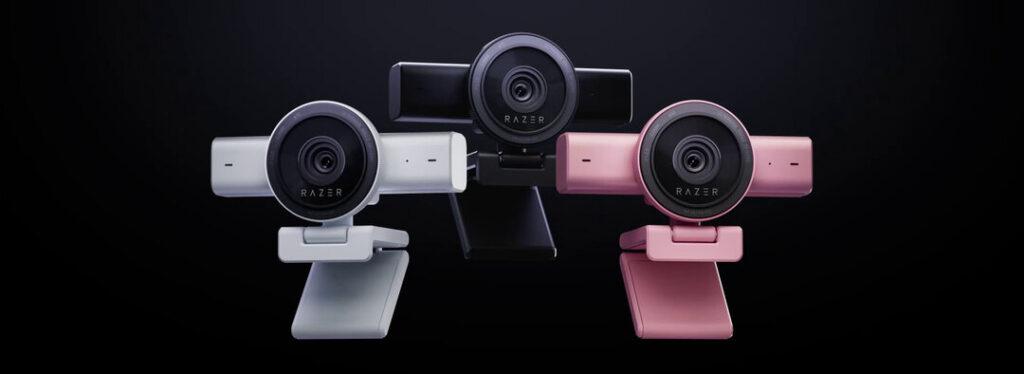
Razer positions the Kiyo V2 as a 4K 30FPS webcam with AI-powered auto-framing, one-click image enhancement, HDR, wide-angle framing, privacy shutter, and Synapse customization. The AI webcam feature list also points to Camo Studio support, including additional AI tools such as background removal and overlays.
That makes the product interesting because it targets creators who do not want to manually manage every camera setting. Auto-framing can keep the subject centered. Automatic exposure and white-balance tools can reduce setup time. HDR can help scenes with bright and dark areas.
But automation is not the same as control. AI can assist framing, but it cannot fix every room, light source, desk angle, or streaming workflow.
4K30 Is Useful, But Not Always For Live Streaming
The Kiyo V2’s 4K30 mode sounds premium, and it can be useful for recording, cropping, product shots, tutorials, and sharp video calls. A creator who wants to zoom into frame without losing too much detail may benefit from the extra pixels.
Live streaming is more complicated. Many streamers still broadcast at 1080p or use a smaller facecam window inside a larger gameplay scene. In those cases, 4K capture may help with processing and reframing, but the viewer may not see a dramatic resolution jump.
The smoother 1080p60 option can also matter more for creators who move often on camera. Tech reviewers have noted the Kiyo V2’s 4K30 and 1080p60 split, and a hands-on webcam review also emphasized that the AI features are useful but not necessarily revolutionary.
The smart question is not “does it have 4K?” It is “does 4K improve this creator’s actual stream?”
Lighting Still Decides The Image
Razer promotes real-time light correction and image enhancement, but streamers should not confuse software correction with good lighting. A camera can brighten a dark face, reduce some noise, and adjust white balance, yet it still performs better when the scene is lit properly.
That is especially true for gaming rooms full of RGB. Purple walls, bright monitors, backlit windows, and dim front lighting can confuse any webcam. A key light gives the camera a cleaner image to process and reduces the need for aggressive correction.
A better webcam should be the second step, not always the first. The creator who pairs Kiyo V2 with controlled lighting will likely get more from it than someone expecting AI to rescue a dark room.
Lighting beats rescue software when consistency matters.
The Checklist Streamers Should Use
A proper Razer Kiyo V2 review should test the webcam like a streamer, not like a laptop accessory.
| Review Check | Why It Matters | What To Look For |
|---|---|---|
| 4K30 quality | Tests sharpness | Clear detail without overprocessing |
| 1080p60 mode | Tests motion | Smooth movement during live scenes |
| Auto-framing | Tests AI value | Keeps subject centered naturally |
| HDR handling | Tests mixed lighting | Controls bright and dark areas |
| Low-light behavior | Tests real rooms | Less grain without plastic skin |
| Mount stability | Tests desk use | Holds angle on monitor or tripod |
| Software control | Tests workflow | Settings are easy to repeat |
This checklist keeps the review grounded in creator needs. A webcam is not great because it has more features. It is great if those features reduce friction every time the streamer goes live.
Privacy And Software Are Part Of The Product
The integrated privacy shutter is a practical feature because webcams now live on desks full-time. A physical cover is still one of the clearest ways to make users feel safe when the camera is not in use.
Software is the more complicated part. Razer Synapse customization gives users control, but software ecosystems can also become a point of friction. Creators should test whether settings persist, whether the app is easy to manage, and whether the camera behaves consistently across OBS, video calls, and recording tools.
PC Gamer’s webcam test notes highlighted the Kiyo V2’s 4K/1440p at 30 fps, 1080p at 60 fps, 93-degree field of view, USB-C connection, and 8.3 MP Sony Starvis sensor. Those specs are useful, but day-to-day reliability will decide whether the webcam feels like a good upgrade.
AI Framing Helps Certain Creators More
Auto-framing is most useful for creators who move. Fitness streamers, product demonstrators, educators, desk reviewers, musicians, and talk-heavy creators may benefit more than gamers who sit centered in a chair for three hours.
A standard gaming streamer may use the feature less often. If the facecam is a small box in the corner, constant AI reframing could even feel unnecessary. Manual framing might be cleaner.
This is where AI webcam marketing can get ahead of actual needs. Some creators need smart tracking. Others need better exposure, better lighting, or a better mic. The use case should lead, not the feature list.
The Next Webcam Upgrade Is About The Whole Stream
The Razer Kiyo V2 AI webcam is interesting because it brings strong camera features into a creator-friendly package, but it also exposes a familiar truth: no webcam fixes the whole stream alone.
The next pressure point for streamers is balance. Camera, light, microphone, capture card, OBS scenes, internet stability, and encoding settings all shape the final result. A stronger webcam can improve the picture, but it cannot make a weak setup feel professional by itself.
The Razer Kiyo V2 AI webcam makes the most sense for creators who already care about lighting, framing, and workflow but want sharper capture and smarter assistance. For beginners, the better first purchase may still be a key light or microphone. AI can make camera setup easier, but the stream still rewards creators who build the whole chain properly.