

Ethernet vs Wi-Fi 7 gaming is one of the rare tech debates where the newer technology is exciting and the older answer still refuses to die. Wi-Fi 7 brings serious wireless upgrades, but a cable remains hard to beat when stability matters most.
That tension matters because modern gaming setups are no longer just one console beside a router. Players now use gaming laptops, handheld PCs, cloud gaming, Discord, live streaming, smart TVs, and multi-device homes. A previous look at the Wi-Fi 7 router upgrade showed why the new wireless standard matters, but the cable question still deserves its own verdict.
Ethernet vs Wi-Fi 7 Gaming Starts With Stability
Ethernet has one huge advantage: it removes the air. A wired connection avoids wireless interference, band congestion, weak signal zones, distance issues, and the weird performance dips that happen when walls, furniture, and other devices get involved.
Wi-Fi 7 is designed to improve wireless capacity, speed, and latency. Intel’s Wi-Fi 7 technology overview highlights features such as 320 MHz channels, 4K QAM, and Multi-Link Operation, which can help compatible devices use wireless spectrum more efficiently.
But gaming is not only about peak speed. It is about consistent response. Stable latency beats headline speed when a match depends on timing.
| Gaming Need | Ethernet | Wi-Fi 7 |
|---|---|---|
| Lowest local instability | Stronger | Improved, but environment-dependent |
| Best for competitive play | Yes | Good when signal is excellent |
| Best for handhelds | Limited by cable | Stronger fit |
| Setup difficulty | Cable routing needed | Router placement needed |
| Streaming reliability | Strong | Good with clean signal |
| Multi-device home | Simple for one device | Better for many wireless devices |
| Main weakness | Less flexible | More variables |
Wi-Fi 7 Is A Real Upgrade, Not Just Marketing
Wi-Fi 7 is not just a renamed Wi-Fi 6E. The standard brings higher potential throughput, wider channels, and smarter multi-band behavior. The IEEE 802.11be generation is designed around extremely high throughput, and Wi-Fi 7 devices are built to improve wireless performance where older networks struggle.
The most interesting feature for gamers is Multi-Link Operation. Instead of treating wireless bands as separate lanes, compatible Wi-Fi 7 equipment can use links more intelligently. That can help reduce congestion and improve consistency in busy environments.
Still, the word “compatible” is doing a lot of work. The router, client device, region, channel availability, firmware, and room conditions all affect what Wi-Fi 7 can actually deliver. A Wi-Fi 7 router does not make an older console or laptop suddenly support every Wi-Fi 7 feature.
Ethernet Still Wins For Ranked And Streaming Setups
If the gaming PC or console is close enough to the router, Ethernet should usually be the first choice. It is predictable, cheap, and simple once installed. A cable does not care about the neighbor’s router, the microwave, a thick wall, or the number of phones in the room.
IEEE’s Ethernet standard details show why Ethernet remains the foundation for local network connections across many environments. For gamers, the practical point is simpler: wired networking reduces the number of things that can go wrong between the device and router.
Streamers benefit too. Upload stability is critical during live broadcasts, and a wired connection helps protect the path from the streaming PC to the router. It will not fix ISP congestion or a weak upload plan, but it removes local Wi-Fi as a suspect.
Ethernet is boring in the best way.
Wi-Fi 7 Makes More Sense For Modern Gaming Homes
Not every gamer can run a cable. Renters, shared rooms, living-room consoles, handheld PCs, gaming laptops, and multi-floor homes often depend on wireless. This is where Wi-Fi 7 becomes more valuable.
A strong Wi-Fi 7 setup can help homes packed with phones, tablets, TVs, laptops, consoles, and smart devices. It can also make more sense for handheld gaming PCs that move around the house. A cable may be technically better, but it is useless if the device is designed to be played on the couch.
Router placement matters more than most buyers expect. A Wi-Fi 7 router buried behind a TV stand or trapped in a corner may perform worse than a well-placed older router. Wireless gaming quality depends on line of sight, band choice, distance, interference, and signal strength.
Ping Is Not The Only Number That Matters
Gamers often obsess over ping, but the full experience depends on latency, jitter, packet loss, and stability. A low ping that spikes every few seconds can feel worse than a slightly higher ping that stays consistent.
Wi-Fi is more vulnerable to those swings because the environment keeps changing. Devices move. Other networks overlap. People walk between rooms. Smart devices wake up. A router shifts traffic across bands.
Ethernet does not eliminate every network problem, but it narrows the diagnosis. If lag continues on Ethernet, the issue is more likely the game server, ISP route, modem, congestion, or platform service. That clarity has real value.
The Best Setup May Use Both
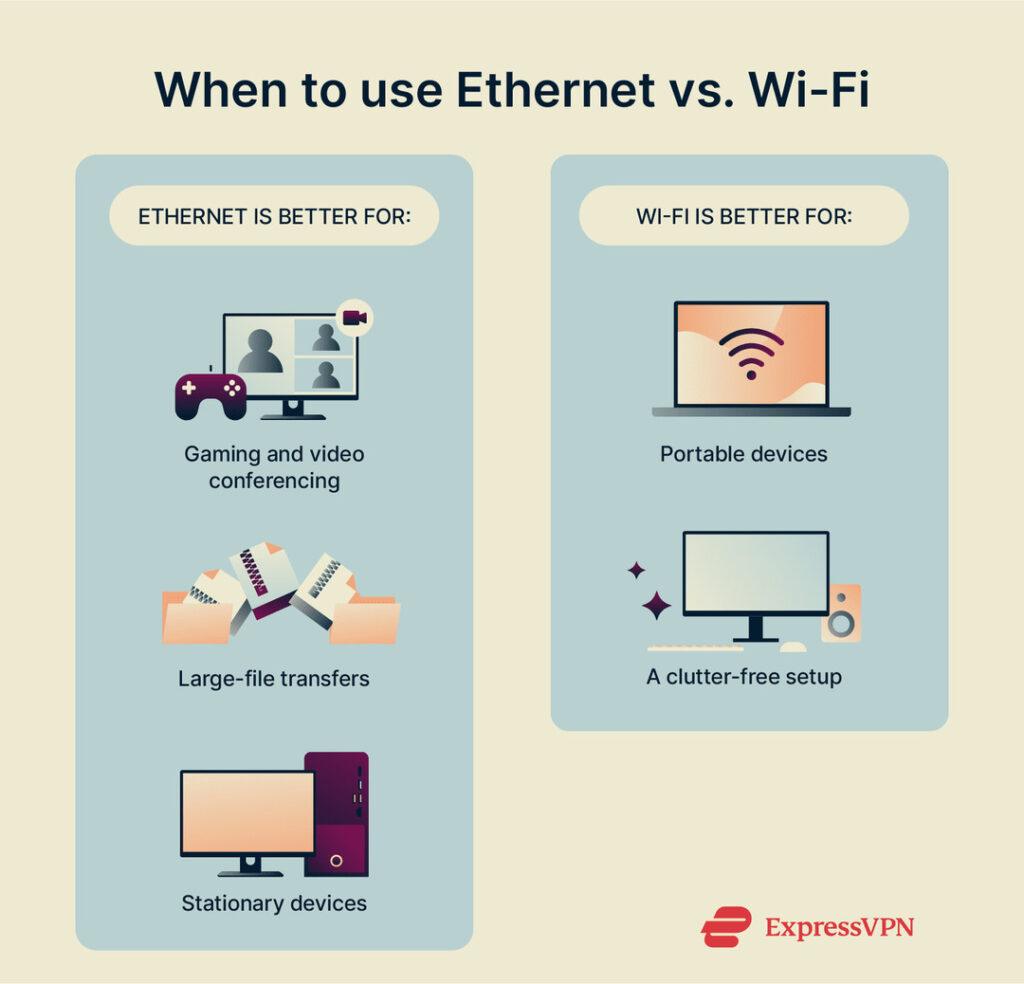
The smartest home gaming network is often hybrid. Use Ethernet for the main gaming PC, console, or streaming computer. Use Wi-Fi 7 for handhelds, laptops, phones, tablets, and secondary devices.
This keeps the most latency-sensitive gear wired while letting newer wireless devices benefit from better capacity. It also reduces wireless congestion because the main high-demand device is no longer competing over the air.
A simple unmanaged switch can make Ethernet easier if the router has too few ports. Mesh can help Wi-Fi coverage, but gamers should be careful with wireless backhaul placement because each hop can add complexity.
The Next Connection Upgrade Is Diagnosis
The next pressure point is not whether Wi-Fi 7 can beat Ethernet in a perfect test. It is whether buyers can identify the real weak point in their own home. A bad modem, poor router placement, crowded channel, weak mesh node, old client device, or unstable ISP can all look like “gaming lag.”
Ethernet vs Wi-Fi 7 gaming matters because both options can be right in different places. Use Ethernet where the device stays still and performance matters most. Use Wi-Fi 7 where mobility, coverage, and modern wireless capacity matter more. The best gaming network is not the newest one or the neatest one; it is the one that stays consistent when the match gets stressful.