

I’ve tested plenty of handheld gaming devices over the years, but the moment I got my hands on the GPD Win 5, it was clear this wasn’t just another incremental upgrade. This device doesn’t try to compete with traditional consoles it aims to replace your gaming laptop altogether.
What immediately stands out is the ambition behind it. The GPD Win 5 is not built for casual mobile gaming; it’s designed for users who want full desktop-level performance in a portable form factor. That’s a bold claim, but after spending time with it, I can confidently say it gets surprisingly close.
Design and Build: Compact but Purposeful
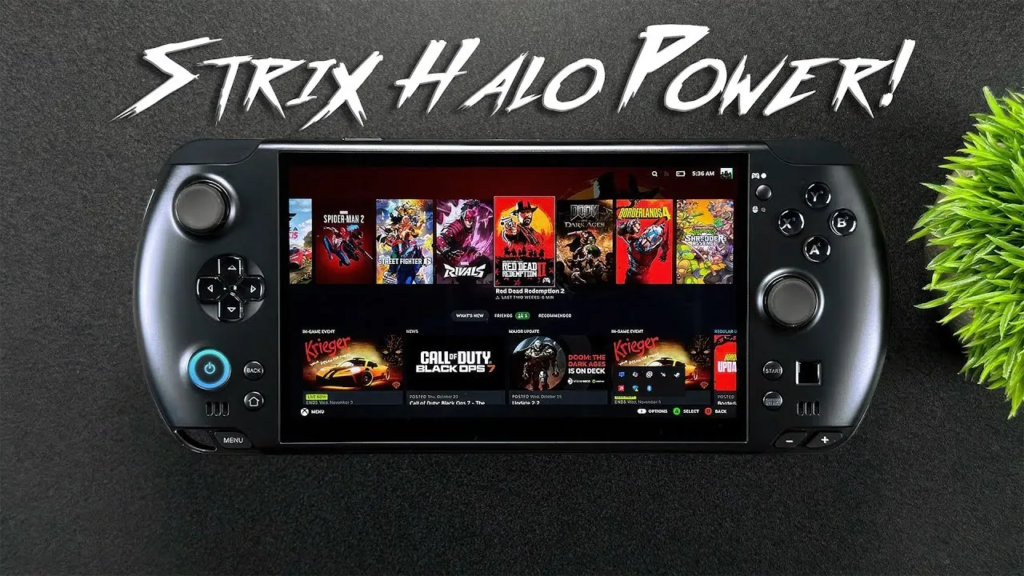
The design of the GPD Win 5 strikes a balance between portability and functionality. It’s compact enough to carry in a small bag, yet it feels dense and premium in the hand. The integrated controls analog sticks, triggers, and buttons are positioned in a way that feels natural for extended gaming sessions.
What I personally appreciate is the inclusion of a mini keyboard, which transforms the device from a simple gaming handheld into a true portable PC workstation. Whether I’m typing quick commands, browsing, or even doing light productivity work, that feature adds a level of versatility most competitors simply don’t offer.
This isn’t just a gaming gadget it’s a multi-purpose computing device.
Performance: Desktop Power in Your Hands
The real headline feature of the GPD Win 5 is its performance. Powered by an AMD Ryzen AI processor, this handheld is capable of running modern AAA titles with impressive stability.
From my experience, games that typically demand a full desktop setup can run smoothly here, especially when paired with optimized settings. The addition of AI-enhanced processing helps manage performance and efficiency, allowing the system to balance power and battery life intelligently.
Configurations offering up to 32GB of RAM and substantial SSD storage mean you’re not limited in what you can install or run. This is where the GPD Win 5 separates itself from typical handheld consoles—it doesn’t restrict you. It gives you freedom similar to a full PC.
Display and Visual Experience
The 120Hz display is another standout feature. The difference between standard refresh rates and 120Hz is immediately noticeable, especially in fast-paced games. Movement feels smoother, more responsive, and far more immersive.
Colors are vibrant, and the screen size, while compact, is well-optimized for gaming. I found it particularly enjoyable when playing competitive titles where responsiveness matters.
In simple terms, the display doesn’t feel like a compromise it feels like a premium gaming panel scaled down for portability.
Gaming Experience: More Than Just Play
What impressed me most about the GPD Win 5 is how it transforms the idea of handheld gaming. This isn’t just about playing games on the go it’s about having your entire gaming library in your pocket.
Because it runs a full operating system, you’re not limited to a specific platform. You can access:
- Steam
- Epic Games Store
- Emulators
- Even productivity apps
This level of flexibility changes how you think about gaming devices. Instead of switching between systems, you have one device that does it all.
Battery Life and Practical Use
Of course, with great power comes the inevitable challenge of battery life. In my testing, the GPD Win 5 performs well for a device of its caliber, but heavy gaming sessions will still drain the battery relatively quickly.
That said, this is expected. You’re essentially carrying a high-performance PC in handheld form. For casual use, media consumption, or lighter tasks, the battery holds up much better.
In practical terms, this is a device best suited for:
- Short gaming sessions on the go
- Travel with access to charging
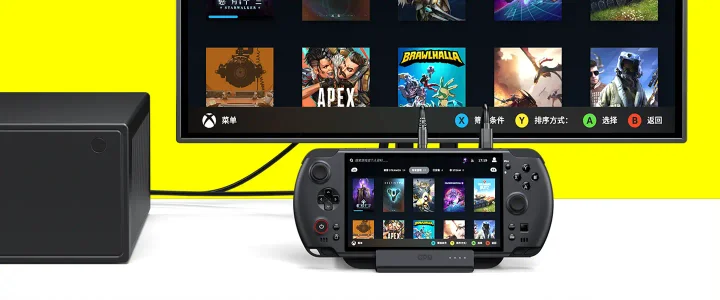
- Hybrid use between portable and plugged-in setups
Price and Where to Buy
The GPD Win 5 is positioned as a premium device, and its pricing reflects that.
- Estimated price range: $900 – $1,300, depending on configuration
You can explore or purchase the device from trusted retailers:
- Official site: GPD Official Store
- Alternative listing :Indiegogo (GPD campaigns)
While it’s not a budget option, the value lies in its ability to replace multiple devices—gaming console, laptop, and even a secondary workstation.
Who Should Buy the GPD Win 5?
From my perspective, this device is ideal for a very specific type of user.
It’s perfect for:
- Hardcore gamers who want portability
- Tech enthusiasts who value innovation
- Professionals needing a compact PC on the go
However, it may not be the best fit for casual users who only need basic gaming or entertainment.
Final Verdict: A Portable Powerhouse With Purpose
After spending time with the GPD Win 5, I see it as more than just a gadget it’s a statement about the future of computing. The idea that you can carry this level of performance in your hands is remarkable.
It’s not flawless. Battery limitations and price may deter some users. But if you’re looking for cutting-edge technology that blends gaming and productivity, this device delivers in a way few others can.
Pros:
- Exceptional performance for its size
- True PC-level flexibility
- High refresh rate display
Cons:
- Premium price point
- Battery life under heavy load
The Bigger Picture
What the GPD Win 5 represents is a shift. Devices are no longer defined by single purposes. This handheld proves that gaming, work, and entertainment can coexist in one powerful package.
And if this is where portable tech is heading, I have to say it’s an exciting direction.
⭐ RAVE-TECH Final Score: 9/10