

A gaming DAC/Amp vs USB audio interface decision usually starts with one complaint: the setup sounds wrong. The headphones are quiet, the mic sounds thin, Discord levels jump around, or the stream mix feels harder to control than it should.
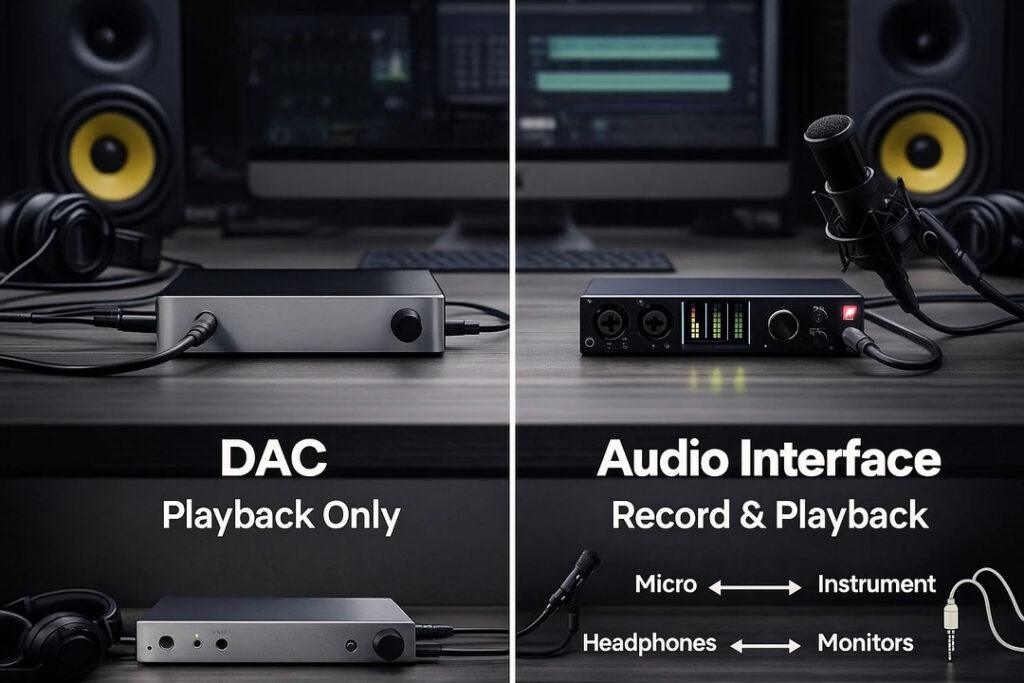
The mistake is buying the first “audio upgrade” without identifying whether the problem is headphone output or microphone control. A DAC/Amp is usually about better listening. A USB audio interface is usually about better input, routing, and recording. That distinction matters for streamers already thinking about microphone upgrades instead of just louder headphones.
Gaming DAC/Amp vs USB Audio Interface Starts With Direction
A DAC converts digital audio from the computer into an analog signal. An amplifier drives headphones with more power and control. A gaming DAC/Amp often focuses on headphone sound, virtual surround features, EQ, chat mix, and console or PC compatibility.
A USB audio interface focuses on bringing microphones and instruments into the computer. It usually includes mic preamps, gain controls, XLR inputs, headphone monitoring, line outputs, and recording-friendly controls.
Focusrite’s 2i2 interface specs show that an interface is built around inputs, preamps, gain control, and recording workflow. That is very different from a gaming DAC/Amp designed mainly to improve the listening side.
Audio upgrades are directional. Know whether the sound problem is coming in or going out.
| Setup Problem | Better Fit | Why |
|---|---|---|
| Headphones are too quiet | DAC/Amp | More headphone power |
| XLR mic needs connection | USB audio interface | Provides mic input and preamp |
| Stream voice clips | USB audio interface | Better gain control |
| Game audio lacks punch | DAC/Amp | Better listening chain |
| Need direct mic monitoring | USB audio interface | Built for recording workflow |
| Want gaming EQ/chat controls | Gaming DAC/Amp | Often includes gaming features |
| Use studio monitors | USB audio interface | Line outputs help |
Interfaces Are Better For Stream Voice Control
A USB audio interface is the smarter upgrade for streamers using XLR microphones. It gives the mic proper input, gain control, phantom power when needed, and headphone monitoring. That can make voice recording more predictable.
Interfaces are also useful when the creator wants a cleaner path into OBS, Discord, or editing software. The physical gain knob alone can be valuable because it lets the streamer react quickly when a mic is too hot or too low.
The interface does not automatically make audio professional. Mic placement, room noise, gain staging, pop filtering, and speaking distance still matter. But an interface gives creators the controls they need to fix those problems more precisely.
Control matters more than volume for stream audio.
Gaming Features Can Be Useful, But They Can Also Distract
Some DAC/Amps advertise surround processing, footstep enhancement, and special gaming modes. These features can be useful, especially for players who like quick EQ profiles or need console-friendly controls.
But more processing is not always better. Heavy virtual surround or boosted treble can make audio feel exciting while hurting natural balance. Competitive players may prefer a clear stereo image with restrained EQ rather than dramatic effects.
Interfaces tend to be more neutral. They are not usually built for gaming sound tricks. That can be a weakness for casual players but a strength for creators who want clean recording and monitoring.
The right choice depends on whether the user wants entertainment tuning or production control.
Headphones And Microphones Decide The Purchase
The gear already on the desk should decide the upgrade. A USB microphone may not need an interface at all. A high-impedance headphone may benefit from a stronger DAC/Amp. An XLR microphone practically requires an interface, mixer, or similar input device.
A headset with a single combo plug may complicate both options. Some DAC/Amps support headset mics. Many studio interfaces do not support typical 3.5mm headset microphones without adapters, and even then the workflow may be awkward.
Buyers should check connectors before buying. XLR, 3.5mm TRRS, 6.35mm, USB-C, optical, RCA, line out, monitor out, and console support all matter. The wrong ports ruin good gear.
DAC/Amps Help Headphones First
A gaming DAC/Amp makes sense when the headphones are the weak point in the chain. Some headphones need more power than a motherboard, controller, or laptop jack can comfortably provide. Others may benefit from cleaner output, better volume control, or EQ.
Gaming-focused DAC/Amps can also add features players actually use: game/chat balance, scout-style audio modes, virtual surround, profile switching, and console compatibility. Creative’s GC7 audio features show how this category often blends headphone driving with gaming controls.
The caution is that a DAC/Amp does not turn a bad microphone into a studio mic. It may improve what you hear, not what your viewers hear. If the stream voice is the problem, the solution may live on the input side.
Streamers May Eventually Need Both
Some setups benefit from both devices. A creator might use an interface for an XLR microphone and a DAC/Amp for demanding headphones. Others may use one interface that has a good enough headphone output and skip the dedicated DAC/Amp.
The simpler setup is usually better at first. Audio chains can become confusing when multiple devices fight for default input, default output, sample rate, monitoring, and routing.
Before adding hardware, fix placement and levels. A better mic position, lower room noise, and clean gain staging may help more than another box on the desk.
The Next Audio Upgrade Should Solve The Actual Pain
The next pressure point in gaming audio is clarity. Players want better headphone detail, while streamers need cleaner voice control. Those goals overlap, but they are not the same.
A gaming DAC/Amp is the right move when headphones need more power, cleaner output, or gaming-specific listening controls. A USB audio interface is the right move when the microphone, recording chain, or live voice mix needs control.
Gaming DAC/Amp vs USB audio interface matters because audio gear gets expensive quickly when the problem is vague. Identify whether the weak link is what you hear or what your audience hears. Then buy the device built for that side of the signal.