

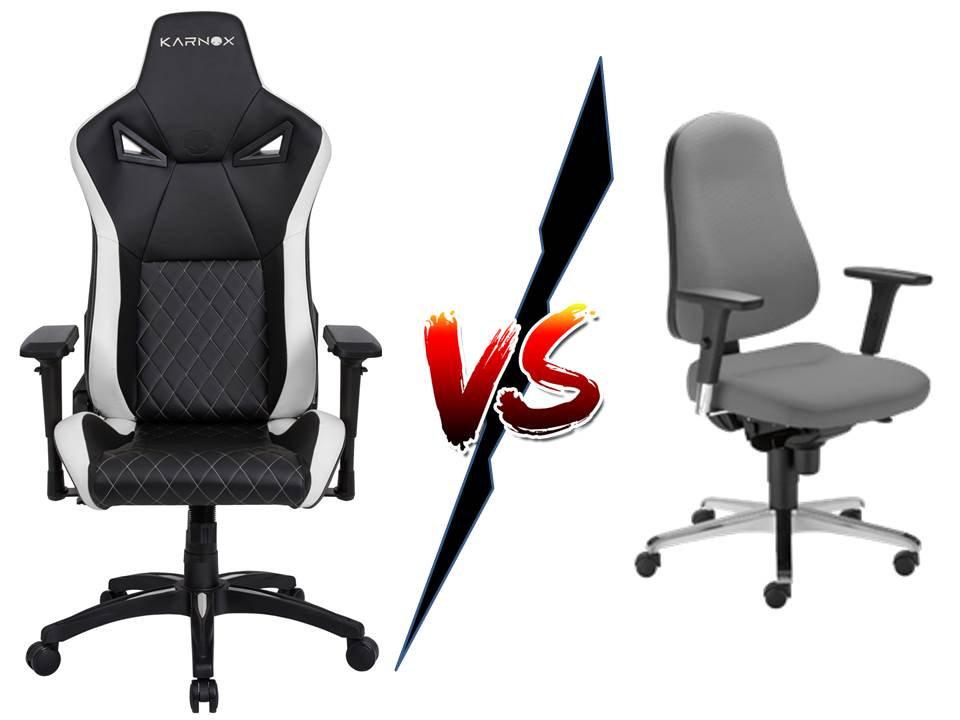
Gaming chair vs office chair is one of those setup debates that looks simple until the first three-hour session says otherwise. A chair can look aggressive, premium, and streamer-ready, yet still fail if it does not fit the body, desk height, and daily routine.
That is why buyers should compare support, adjustment, and comfort before style. Rave-Tech already covers ergonomic gaming chairs, but the harder question is whether a gaming-branded chair is actually the right tool for long gaming, editing, streaming, and work.
Gaming Chair vs Office Chair Starts With Support
The gaming chair category grew around racing-style designs, high backs, bolsters, recline angles, and bold colors. Office chairs grew around adjustability, task work, breathable materials, and neutral posture.
Neither category wins automatically. A well-built gaming chair can be comfortable. A cheap office chair can be awful. The key is not the label; it is whether the chair supports the back, legs, arms, and posture during real use.
OSHA’s chair guidance says a good chair should support the back, legs, buttocks, and arms while reducing awkward posture and contact stress. That workstation chair guidance applies directly to gamers who spend long stretches at a desk. The chair must fit the user, not just the room’s aesthetic.
| Buying Factor | Gaming Chair | Ergonomic Office Chair |
|---|---|---|
| Visual style | Bold and gaming-focused | Neutral and work-focused |
| Back support | Varies by model | Often more adjustable |
| Seat shape | Can include bolsters | Usually flatter and task-friendly |
| Materials | PU leather, fabric, foam | Mesh, fabric, foam, mixed |
| Long work sessions | Model-dependent | Usually stronger fit |
| Streaming look | More recognizable | Cleaner and less distracting |
| Best buyer | Style-conscious gamer | Comfort-first desk user |
Gaming Chairs Win On Identity And Recline
Gaming chairs are popular for a reason. They look like gaming gear. They match RGB setups, racing wheels, streamer rooms, and high-energy desk designs. For creators, the chair also becomes part of the camera frame.
Some gaming chairs also recline deeply, include head pillows, use thick foam, and provide a high back that feels supportive during casual use. For players who lean back with a controller or take breaks between matches, that can feel better than a plain task chair.
The weakness is that racing-style bolsters are not useful for everyone. A seat shape inspired by a car does not automatically help someone sitting at a desk. Side bolsters can restrict leg position. Detached lumbar pillows can move around. Harder foam may feel supportive at first but tiring later.
Office Chairs Usually Win On Adjustability
A good ergonomic office chair is built for long sessions in a more technical way. Seat depth, lumbar position, armrest height, recline tension, back support, and breathable materials can all affect comfort.
The Canadian Centre for Occupational Health and Safety notes that a chair becomes ergonomic only when it suits the worker’s body, workstation, and tasks. That chair fit principle is the point many buyers miss.
An office chair may look less exciting, but it can be easier to tune to the body. For people who game, work, edit, write, and stream from the same desk, that adjustability may matter more than a headrest logo. Adjustability beats branding during long sessions.
Materials Change The Daily Experience
Material choice can decide whether a chair feels good after the first hour. PU leather can look sleek and be easy to clean, but it may trap heat. Fabric can feel softer and breathe better, but it may stain more easily. Mesh improves airflow, though some users prefer the cushion feel of foam.
Gamers in warm rooms should be especially careful with leather-style chairs. A chair can feel premium in a showroom and uncomfortable after a summer night of gaming.
Foam density matters too, but buyers should be cautious with vague claims. Firm foam is not automatically better. Soft foam is not automatically more comfortable. The best seat supports posture without creating pressure points.
Armrests And Desk Height Are Often Ignored
Armrests can make or break the setup. If they sit too high, shoulders rise. If they sit too low, wrists and elbows lose support. If they collide with the desk, the user sits too far away from the keyboard.
This is why chair shopping should include the desk. A chair that cannot slide under the desk may force poor posture. A chair with non-adjustable arms may be fine for controller gaming but awkward for keyboard and mouse play.
Players should also check seat height. Feet should rest comfortably on the floor or a footrest, and the keyboard and mouse should not force the wrists upward. The chair is only one part of the workstation.
The Real Value Is Long-Session Comfort
A gaming chair may be worth it if it fits well, supports your back, matches your setup, and feels comfortable after multiple hours. An office chair may be worth the higher price if it gives better adjustment, airflow, and posture support.
The better purchase depends on the person, not the category. A smaller user, taller user, broad-shouldered user, controller player, keyboard player, and full-time streamer may all need different seats.
The biggest mistake is buying for a photo instead of a body. A chair that looks perfect in a battlestation shot can still be wrong for the person sitting in it.
The Next Chair Upgrade Should Be Measured In Hours
The next pressure point for chair buyers is durability. A cheap chair that feels fine for three months may lose cushion support, wobble, peel, or develop noisy mechanisms. A more expensive chair should justify itself through comfort, adjustability, build quality, warranty, and long-term support.
Buyers should also think about the full setup: desk height, monitor position, foot support, keyboard tray, and movement breaks. No chair can solve a bad workstation alone.
Gaming chair vs office chair matters because gamers are no longer only playing for one hour at a time. The chair now supports work, content creation, ranked sessions, video calls, and editing. Choose the seat that fits your body and routine first. Style can matter, but comfort has to survive the session.