

Dota 2 has always been the kind of esport that makes casual viewing feel like trying to read a chessboard during an earthquake. One fight breaks out near Roshan, a support buys back, two smoke ganks miss each other by inches, and suddenly the entire match flips because one hero found a 12-second window to exist in the right pixel of fog.
That chaos is exactly why the Esports World Cup race matters for streamers and creators. DreamLeague Season 29, held from May 13 to May 24, 2026, was not just another high-level Dota 2 event with elite names like PARIVISION, Aurora Gaming, Team Spirit, Team Falcons, Tundra Esports, Xtreme Gaming, Team Liquid, BetBoom Team, Natus Vincere, and Nigma Galaxy in the mix. It was part of the ESL Pro Tour pressure cooker, carrying a $1 million prize pool and 28,300 EPT points at a moment when every draft, comeback, and bracket swing could reshape the road toward Esports World Cup 2026.
For viewers, that means more intensity. For streamers, it means something more demanding: your setup has to keep up with the match, the data, the chat, and the story all at once.
Dota 2 Is No Longer A One-Screen Viewing Experience
A casual Dota stream used to be simple. Open the match, listen to the casters, maybe check the bracket between games. That still works if you only want the big moments. But World Cup-level Dota 2 has turned the viewing experience into something closer to a miniature broadcast desk.
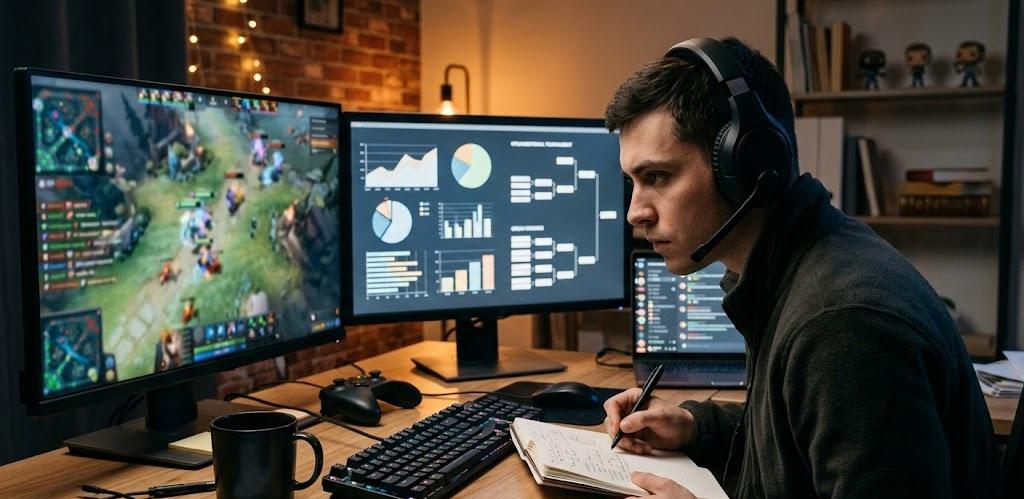
The match feed tells you what is happening. The draft panel explains why it might happen. The live stats show whether the gold lead is real or fake. Social media gives instant reactions. Brackets frame the consequences. Betting and odds pages add another layer of market expectation, especially when tournament form changes quickly across a group stage or playoff run.
That is why modern Dota 2 creators increasingly need a setup that behaves less like a gaming desk and more like a control room. One monitor for the main broadcast is fine until chat starts debating hero win rates, a team’s recent form, or whether a late-game draft actually scales. Then the creator needs browser tabs, stat pages, Discord, OBS, alerts, audio controls, and notes moving in sync without making the stream feel like a browser-window car crash.
Rave-Tech has already covered why stream quality settings matter across platforms, but Dota 2 adds another layer: the game’s story can change faster than a streamer can explain it. If the stream stutters during a base defense, if audio desyncs during a caster call, or if a creator misses a buyback because their second monitor is cluttered, the viewer experience takes the hit.
The Esports World Cup Race Makes Context Part Of The Content
The Esports World Cup race changes how creators frame Dota 2 coverage. A regular tournament can be covered match by match. A World Cup-connected tournament asks a bigger question: what does this result mean beyond today?
That matters because DreamLeague Season 29 was not isolated from the broader 2026 Dota calendar. With EPT points, elite teams, and late-season momentum in play, the event became part of the bigger competitive map. A group-stage win was not just a group-stage win. A playoff loss was not just a bad weekend. For teams chasing global positioning, every series shaped the story.
That puts new pressure on streamers. The audience no longer wants only reaction. They want interpretation. They want to know why PARIVISION’s run mattered, why Aurora Gaming’s form attracted attention, why Team Spirit remained dangerous, why Team Falcons could not be dismissed, and why a bracket result might shift expectations before the next major stop.
This is where a better streaming setup becomes more than vanity gear. A clean setup helps creators explain complex tournament stakes without slowing down the show. When the tech disappears, the analysis gets sharper.
The New Dota Streaming Setup Needs More Than A Good Webcam
The easiest mistake is assuming esports streaming quality starts with the camera. A crisp facecam helps, sure. But Dota 2 coverage lives or dies on clarity, speed, and information flow.
A creator covering the Esports World Cup race needs enough screen space to follow the main broadcast, monitor live stats, manage OBS scenes, read chat, and keep notes ready for post-game analysis. They need audio routing that separates game sound, caster audio, microphone input, Discord calls, and music beds without turning the stream into a haunted soundboard. They need a stable internet connection that can handle HD streaming while multiple tabs, dashboards, and chat tools keep refreshing in the background.
Here is where the setup starts to matter in practical terms:
| Streaming Need | Why It Matters For Dota 2 Coverage | Setup Priority |
|---|---|---|
| Dual or triple monitors | Keeps match feed, OBS, stats, and chat visible without constant alt-tabbing | High |
| Stable upload speed | Prevents dropped frames during key fights and long broadcasts | High |
| Clean audio routing | Keeps caster audio, mic commentary, and alerts balanced | High |
| Fast scene switching | Helps move from live match to bracket, replay, or analysis screen | Medium |
| Browser/tab organization | Makes team form, schedules, and market context easier to reference | Medium |
| Comfortable desk layout | Reduces fatigue during long group-stage and playoff days | Medium |
This is not about building the most expensive battlestation on the internet. It is about removing friction. A streamer who needs 15 seconds to find the bracket has already lost the moment. A creator whose mic clips every time chat explodes after a team wipe is making the game harder to watch. A viewer should feel like the stream is guiding them through the chaos, not adding a second layer of chaos on top of it.
Odds, Form, And Fast-Moving Match Narratives Create More Tabs
Even if a Rave-Tech reader is not betting, odds movement can still tell a useful story about form, public expectation, and how quickly a tournament narrative changes. During DreamLeague-style events, a team’s perceived strength can shift from one series to the next because Dota 2 is brutally sensitive to patch reads, hero pools, draft confidence, and fatigue.
That is why creators often track more than the official stream. They may check team histories, bracket scenarios, patch trends, player form, and market discussion to understand how viewers are interpreting a matchup. A resource like this DreamLeague Season 29 odds breakdown fits naturally into that wider research layer because it reflects how quickly Dota 2 match expectations can move when a major event sits inside a larger competitive race.
The key is presentation. A tech-focused creator does not need to turn the stream into a betting show. The smarter move is using external context to explain pressure. If a favorite drops Game 1, why does chat panic? If an underdog wins a draft with comfort picks, why does the mood change instantly? If a team enters the event with strong EPT implications, why does one series feel bigger than the scoreboard?
That kind of context rewards creators who build organized, multi-source workflows.
Latency Is The Silent Enemy Of Live Esports Commentary
Dota 2 viewers are unforgiving about spoilers. If chat reacts to a fight before the creator sees it, the stream gets weird fast. If one platform feed is ahead of another, a multistreaming setup can become a spoiler machine. If Discord friends are watching on a different delay, group commentary turns into accidental time travel.
The Esports World Cup race magnifies that problem because more viewers are watching live, more clips are hitting social platforms, and more communities are discussing matches in real time. Latency is not just a technical number; it shapes whether the creator can participate in the moment honestly.
A stronger setup should prioritize wired Ethernet where possible, stable bitrate settings, low-latency platform modes when appropriate, and clean device management. That means no random cloud backup running during a lower-bracket elimination match. No overloaded Wi-Fi because every device in the house is fighting for bandwidth. No 4K source capture if the stream only needs 1080p and the encoder is already sweating like a mid-laner facing three rotations before minute six.
The best setup is not always the flashiest. It is the one that stays boring when the game becomes ridiculous.
Multi-Monitor Layouts Are Becoming The Real Creator Advantage
A strong Dota 2 streaming layout usually starts with two screens, but three can feel like unlocking a new talent tree. The main display carries the broadcast or gameplay. The second handles OBS, chat, and stream health. The third becomes the research layer: bracket, stats, notes, Discord, patch references, or post-game talking points.
This matters because World Cup-season coverage is not just play-by-play. It is storytelling. A creator might need to explain how DreamLeague Season 29 affected the ESL Pro Tour picture, why EPT points matter, which teams are peaking, and how results change expectations for Paris. That is too much context to juggle on one screen unless the creator enjoys alt-tabbing like it is a competitive minigame.
For creators working with limited space, ultrawide monitors can help, but they are not magic. Window management still matters. Browser profiles, pinned tabs, Stream Deck-style shortcuts, and organized OBS scenes can make a mid-range setup feel more professional than a premium setup with zero workflow discipline.
The goal is simple: when the match gets complicated, the desk should make decisions easier, not harder.
Audio Is Where Amateur Streams Give Themselves Away
Dota 2 is not only visual. The sound of a crowd, caster escalation, hero abilities, Discord reactions, and a streamer’s own analysis all compete for space. Poor audio makes that competition painful.
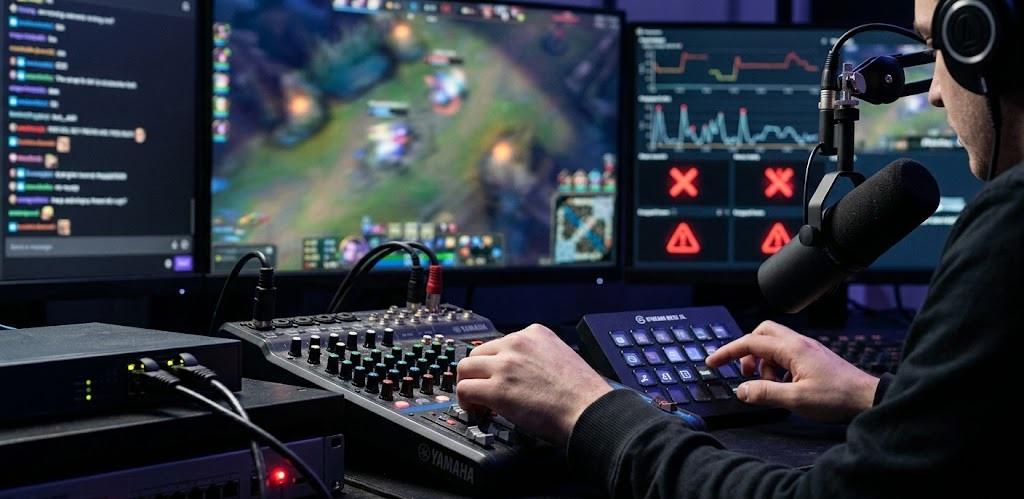
A World Cup-focused stream needs a clean microphone, balanced game/caster volume, controlled alerts, and compression that keeps sudden excitement from becoming distortion. Nobody wants a hype moment ruined because the streamer’s mic explodes during a five-man Black Hole.
The best audio setups are not necessarily expensive. They are intentional. A decent dynamic microphone, a quiet room, basic EQ, noise suppression used carefully, and a consistent monitoring habit can outperform a pricey mic shoved next to a loud keyboard and untreated wall. Dota coverage often runs long, too, so comfort matters. If a creator sounds tired, harsh, or muffled after three hours, the audience feels it.
Audio is the invisible trust layer. When it works, viewers stop noticing it. When it fails, they notice nothing else.
The Smart Upgrade Path For Dota 2 Creators
The temptation during a major esports season is to buy the dramatic upgrade first. New camera. New monitor. New lights. New desk. New everything. Very cinematic. Very expensive. Sometimes very unnecessary.
For Dota 2 creators following the Esports World Cup race, the smarter path is to upgrade the bottleneck that currently breaks the stream. If dropped frames are the problem, fix internet stability and encoder settings before buying a new webcam. If viewers complain about clarity, improve bitrate, resolution, and scene layout. If chat feels disconnected, add better on-screen context and faster moderation tools. If analysis feels scattered, add monitor space or build a cleaner research workflow.
Streaming setups are like Dota drafts: the best choice depends on the win condition. A creator focused on live watch parties needs stability and chat visibility. A creator doing post-match breakdowns needs capture quality and clean scene switching. A creator making short-form clips needs fast replay access, good audio, and a file workflow that does not turn every highlight into a scavenger hunt.
The Esports World Cup race is raising the bar because it makes Dota 2 bigger than the match on screen. It is a calendar story, a team-form story, a production story, and a viewer-experience story all at once.
Creators who treat their setup like a real broadcast tool will have the advantage. Not because they own the most expensive gear, but because they can explain the chaos while everyone else is still looking for the right tab.