

A 5G hotspot vs home internet decision can look tempting for gamers who want flexibility, backup access, or internet in places where wired service is weak. The problem is that gaming does not only care about speed; it cares about latency, packet loss, upload consistency, and whether the connection behaves the same way every night.
That is why a 5G hotspot can feel impressive in a speed test and frustrating during a match. It may be the right tool for travel, backup, or casual gaming, but home internet remains the safer foundation for competitive play and streaming. Rave-Tech’s review of a premium mobile hotspot shows how powerful portable networking can get, but gaming reliability still depends on the network around it.
5G Hotspot vs Home Internet Starts With Latency
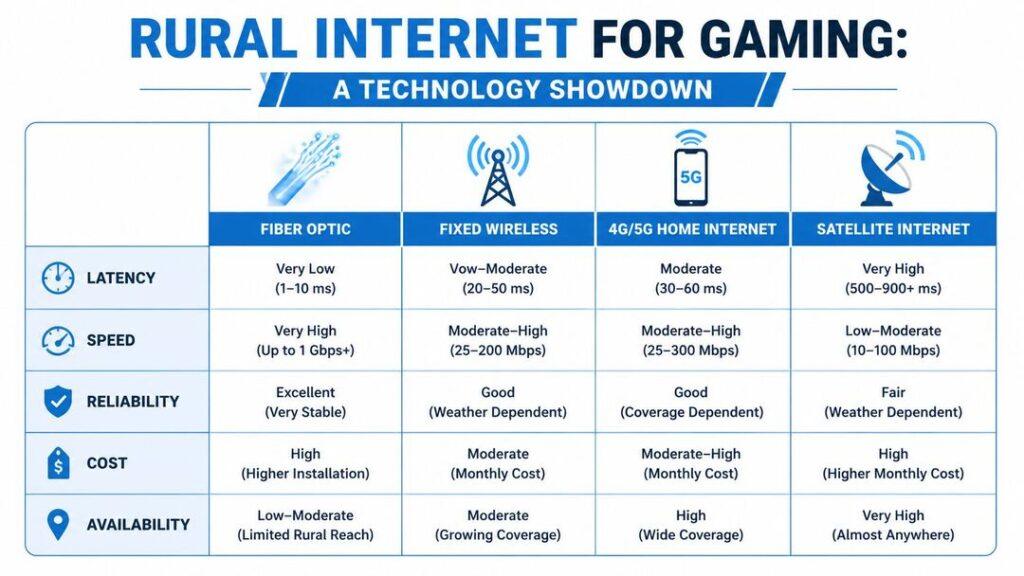
Download speed is the number most people notice first, but latency is the number gamers feel first. A high-speed connection with unstable latency can still produce rubber-banding, delayed inputs, voice chat issues, and sudden match problems.
Home internet, especially cable or fiber, usually provides a more predictable path for gaming. A 5G hotspot depends on signal strength, tower load, carrier routing, indoor placement, weather, building materials, and how many people are using the network nearby.
The FCC’s broadband speed guide separates activities by bandwidth needs, but gaming quality also depends on responsiveness and stability. Fast is not the same as stable, especially in online matches.
| Gaming Factor | 5G Hotspot | Home Internet |
|---|---|---|
| Mobility | Excellent | Fixed location |
| Latency consistency | Varies by signal and tower load | Usually stronger |
| Data limits | Plan-dependent | Often more generous |
| Upload stability | Can fluctuate | Usually better for streaming |
| Best use | Travel, backup, casual play | Main gaming connection |
| Router placement | Signal-sensitive | Easier to optimize indoors |
| Competitive gaming | Riskier | Safer |
Home Internet Still Has The Reliability Advantage
Home internet has the boring advantage gamers need: consistency. A good wired home connection can connect to a router, run Ethernet to a gaming PC or console, and maintain steadier latency than a mobile signal under changing tower conditions.
Streaming raises the stakes. Upload stability matters for Twitch, YouTube, Kick, Discord screen sharing, and cloud backup while gaming. A 5G hotspot may work, but if upload fluctuates, the stream can drop frames or reduce quality.
Home internet also gives gamers more control. Router placement, Ethernet cables, mesh nodes, QoS settings, and modem upgrades are all easier to manage than cellular tower load. Control is part of reliability.
Data Limits And Throttling Can Change The Math
Gaming itself may not use as much data as downloading games, patches, and updates. The real data problem is everything around gaming: 100GB installs, seasonal patches, cloud saves, game captures, streaming, Discord, operating system updates, and downloads across multiple devices.
Some hotspot plans include limits, deprioritization, or hotspot-specific restrictions. Even plans advertised as generous may behave differently under congestion or after heavy use. That can make a hotspot feel fine one week and weaker the next.
Home internet plans vary too, and some include data caps. But for heavy gaming households, home service is usually easier to justify because it supports consoles, PCs, smart TVs, phones, tablets, and streaming without treating every gigabyte like a tactical decision.
Router Placement Is Different From Hotspot Placement
A home router should be placed for coverage across the house. A hotspot should be placed for cellular signal first. Those goals are not always the same.
The best hotspot location may be near a window, upstairs, or on the side of the home closest to a strong tower. The best gaming device location may be a desk far away from that window. That creates a trade-off between cellular reception and Wi-Fi coverage.
Some hotspots include Ethernet, which can help if the hotspot sits near the gaming desk. Others rely entirely on Wi-Fi, which adds another wireless leg after the cellular link. Each leg is another place for instability to appear.
5G Hotspots Win On Flexibility
A 5G hotspot is valuable because it goes where home internet cannot. It can support gaming in a hotel, dorm, temporary apartment, RV, event space, or backup situation when the main connection fails.
Modern hotspots can also be surprisingly capable. NETGEAR’s M6 Pro specifications list 5G Sub-6, mmWave support, Wi-Fi 6E, a touchscreen, USB-C, and a 2.5Gbps Ethernet port. That kind of hardware makes mobile broadband much more serious than old pocket hotspots.
For handheld gaming PCs, laptops, and travel consoles, that flexibility can matter more than perfect ping. A hotspot can make gaming possible when the alternative is no connection at all.
Competitive Players Should Treat Hotspots As Backup
A hotspot can be a great emergency connection, but competitive gamers should be cautious about making it the primary line. Ranked shooters, fighting games, racing sims, and esports titles are less forgiving of latency spikes than casual co-op or turn-based games.
Cloud gaming is even more demanding because the game is rendered remotely and streamed back as video. That means the connection has to handle both input responsiveness and video delivery. A hotspot can work, but the experience depends heavily on local 5G conditions.
The practical answer is to test at the same time of day you normally play. Evening congestion can look very different from a midday speed test.
The Next Connection Choice Is About Backup Strategy
The strongest setup for serious players may not be hotspot or home internet. It may be home internet plus a hotspot backup. That gives the desk a stable primary connection and a fallback option for outages, travel, or temporary setups.
The pressure point is expectation. A 5G hotspot is not a magic replacement for fiber or a strong wired home line. It is a flexible tool that can be excellent in the right location and inconsistent in the wrong one.
5G hotspot vs home internet matters because gamers are asking connections to do more than ever: downloads, streaming, live chat, cloud gaming, handheld play, and competitive matches. Use home internet as the main connection when reliability matters. Use 5G as the flexible option when movement, backup, or location matters more.